Introduction
Availability today
The Community Edition —
edssa-server-ce, the self-hosted verifier binary — is not publicly distributed yet. Two consequences, both of which you will hit as concrete errors rather than as a notice:
- The repository is private.
github.com/edssa-io/edssais not public, sogit clonefails with a permission error unless your account has been granted access. Access is arranged per customer, because the code is BSL 1.1 and part of it is under a patent filing hold — write to support@edssa.io.- The CE image is not on Docker Hub.
edssa/server-ce:1.0.0is referenced throughout the samples but has not been pushed, sodocker pullfails withpull access denied. Publishing is operator-side, after the public migration ofv1.0.0-ce. Every command in these docs runs against an image you build locally from the source tree, so none of them needs the registry.Autopliance, the hosted product, is live and needs none of the above — no source access, no image, no self-hosting. If you want verified traffic and compliance reports today, that is the path that is open: see Autopliance — getting started.
EdSSA is a zero-trust, post-quantum, stateless M2M authentication
engine. The Community Edition (CE) ships as a single binary,
edssa-server-ce, that sits as a sidecar in front of any HTTP
service and refuses inbound traffic that doesn’t carry a valid
X-EdSSA-Token.
What problem does it solve?
Most service-to-service authentication today is “send a bearer token in a header”. The token is a long-lived shared secret:
- If it leaks (logs, env files, exception traces), it remains valid until rotated.
- It can be replayed indefinitely by any party that observes one valid request.
- It binds no information about the caller’s environment, identity, or per-request claim.
EdSSA replaces “send a secret” with “derive a per-request verifier from shared state”. The token on the wire is a fixed- width, wire-safe byte sequence whose content depends on:
- A long-lived seed shared between client and server.
- A per-request sub-identifier the client claims in the token itself (so the verifier knows which sub-fleet / sub-tenant to consult).
- Chaff slots that contain random bytes the verifier ignores (so observed tokens don’t reveal the secret layout).
The verifier performs an O(N) byte comparison with no heap allocations, no locks, no async calls, and no network hops. On the Phase-0 microbench at N=64 the verify call is ~22 ns — within the budget of even the most aggressive operator-grade deployment.
What’s in the Community Edition?
CE is a strict subset of the Enterprise build (see CE feature subset):
- One fleet per binary.
- Token width pinned at 64 bytes.
- Audit tiers 0–2 (
silent/errors/result). - No multi-fleet routing, no swarm, no payload channel, no Tier-3 response-chain replay defence, no Tier-4 Merkle audit.
Held-back paths refuse to validate at boot rather than running in a degraded mode. Operators who need them upgrade to the Enterprise build.
License
CE ships under the Business Source License 1.1 with Apache-2.0 as the Change License after 4 years per file. Additional Use Grant: “non-commercial OR commercial ≤ $1M ARR”. An explicit non-revocable patent grant covers permitted use.
The executed LICENSE, PATENTS and NOTICE files ship at the root of
every distribution, which is the authoritative copy. (The decision record
behind the policy lives in the source repository, which is not public — so
it is named here rather than linked, to save you a 404.)
What it looks like running
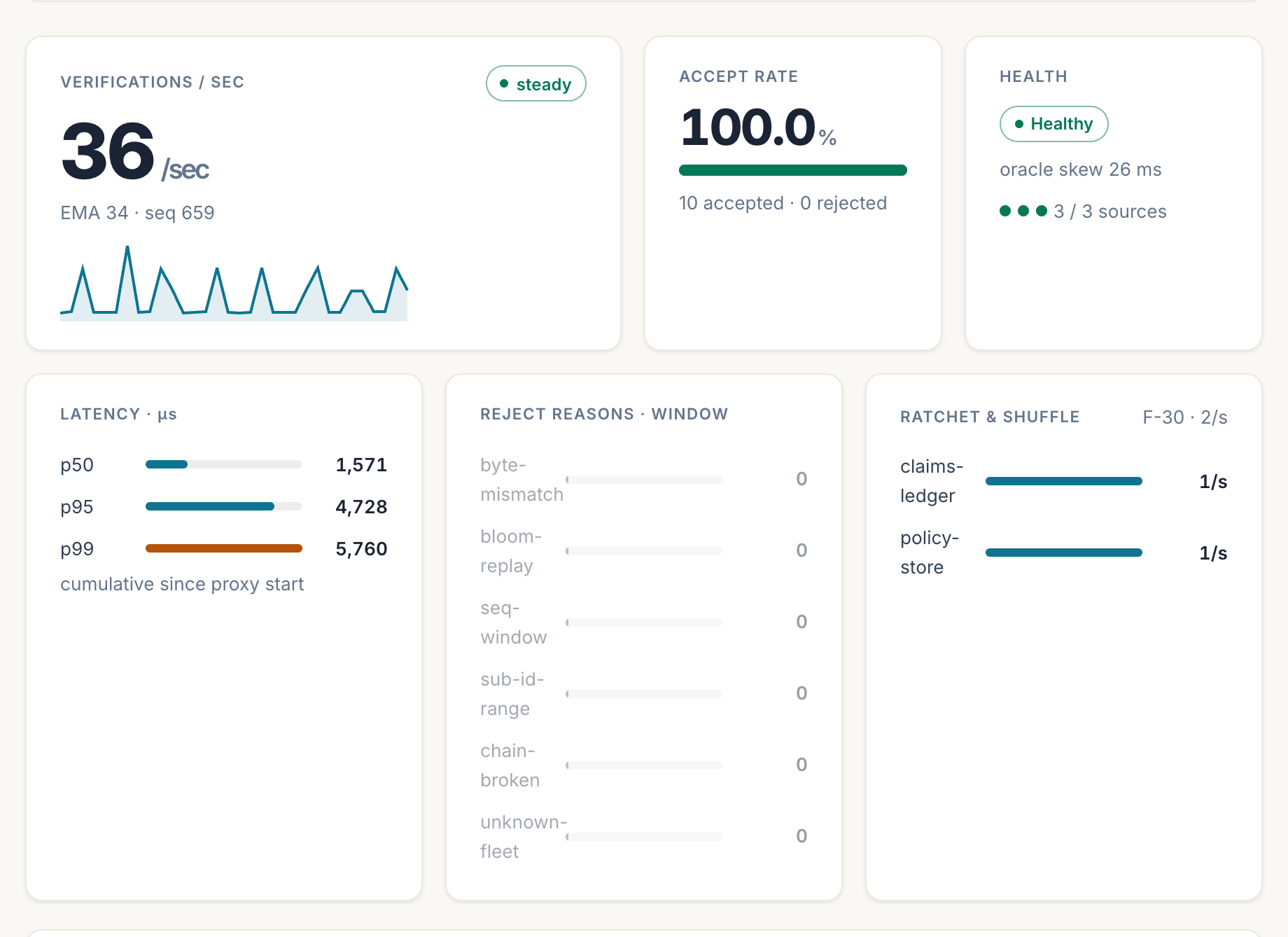
samples/real-local) driving synthetic traffic across three fleets, so every number here is measured rather than mocked. The panel is an Enterprise surface: CE is the verifying binary alone, with no console.The reject-reasons card reading zero is the ordinary case, and the reason it is on the dashboard at all is the interesting one: each counter names a distinct way a credential can fail — the bytes not matching, a replay the Bloom filter caught, a sequence outside the window, an unknown fleet — so when something does break, the panel says which, rather than only that the number went down.
Where to next?
- Want the hosted product rather than the binary? Start with Autopliance — sign up, drive a fleet, generate a report.
- New to EdSSA itself? Start with Quickstart.
- Operator standing up CE in production? Read the Operator runbook.
- Wondering what the patent covers? See Patent advisory.
Autopliance — getting started
EdSSA Autopliance is the hosted compliance product: a subscription that turns a live evidence chain into audit-ready reports. This page takes you from nothing to a generated report, and then to a paid plan, without a sales call. Budget fifteen minutes.
If you want the self-hosted protocol instead, start at the Quickstart — Autopliance is the product for teams who want the evidence without running the infrastructure.
1. Create an account
Go to app.edssa.io/login and enter your work email. The same form creates the account — there is nothing separate to sign up for, and no password exists to choose or lose: sign-in links are single-use and expire in fifteen minutes.
Every new account starts on a 14-day trial. No card is asked for at any point during it.
2. Get your trial fleet
The app’s first step, Test Fleet, provisions a hosted fleet for you: a real verification boundary with its own evidence chain, not a simulation. Two things to know:
- The seed is shown once. It is the fleet’s credential. The reveal page will not show it again, so store it like a password. (We keep the copy the verifier needs; the one on your screen is yours.)
- The fleet is yours for the trial plus a grace period — converting on the last day does not cost you the chain you accumulated.
3. Drive it
A chain with nothing on it proves nothing, so send some traffic:
Have us drive it. The Run it step has a “drive it for me” button that sends real, verified traffic to your fleet from our side — actual credentials checked by the actual verifier, not a mock. Each press runs about two minutes. This is the supported way to build a chain today, and it is part of what you are paying for: the entry plan includes 24 of these a day.
Driving it from your own systems is currently closed. The hosted mint API — the one that hands your systems a ready-made credential to present over plain HTTP — is not open to new accounts while a patent application covering the credential mechanism is being prepared. We expect to open it again once that application is on file.
If you want it before then, ask: pick Access under NDA on the support form in the app, or write to support@edssa.io. We open it per account, under a confidentiality undertaking, and it takes a day rather than a quarter.
Nothing else in this guide depends on it. The fleet, the evidence chain, the anchored reports and the verification all work exactly as described above — the mint API is how you put your own systems in the chain, not how the product works.
The other path — deriving credentials in-process, inside your own binary rather than calling the API — is the one that is still gated: the SDKs are not on any public registry and the repository is private, so it is available under a per-customer source licence. The SDK reference states plainly what you can and cannot install today.
Either way, verified traffic accumulates into anchors on your chain. Ten anchors is enough for a report worth showing to someone.
4. Generate a report
The Generate step renders a report against your own chain. Pick a framework — the catalog spans 34, including NIS2, SOC 2, ISO 27001, GDPR Art. 28, DORA, the EU AI Act, FedRAMP and the Finnish Katakri/PiTuKri/Julkri set — and a format: HTML, PDF, Markdown, JSON, or OSCAL for the GRC pipelines that ingest machine-readable assessment results.
Report provenance is stated on the document and never inflated: a report generated from your live chain says anchored because its verdict was computed by walking that chain.
And it says whose events those were. Where we drove the traffic, every anchored report carries events generated by EdSSA, not by the subject alongside the anchored marking, in all five formats. That makes it good evidence about the EdSSA component in your architecture — the slot a subprocessor’s evidence goes in — and not proof that your own estate is attested.
Once your own systems present credentials, the reports say that instead. A chain carrying both reads as mixed and names each count, and only the externally-presented share is evidence about your systems; the report states it in those words rather than leaving you to infer it. That marking is computed from what actually reached the verifier, so it is not something either of us can set. Which control to file either kind against is covered in Fitting it into your tools.
Example reports for every framework are downloadable without any account on edssa.io/why/compliance — they say so on every page.
5. Upgrade when it earns it
The in-app pricing page lists the tiers; the entry tier is Autopliance at €149/month, and upgrading is one Stripe checkout. No VAT is added today — the seller trades under the Finnish small-business exemption (AVL 3 §) and each invoice states that as the reason — so the price you see is the amount charged. Invoices, card changes, plan changes and cancellation all live in the billing portal, reachable from your account page.
Two commitments worth knowing before you pay:
- Evidence is never held hostage. Nothing is taken away the moment you stop paying. When a subscription or trial ends the account goes read-only and everything stays downloadable for 90 days — every report you generated, in every format, plus a JSON export of your account and its metadata. After that the account and its data are deleted, and we say so plainly: holding your evidence indefinitely, with no contract, is a liability rather than a favour. Download the reports — a finished report does not depend on us existing, which is the point of the product. If you would rather we kept hosting it, Autopliance Archive (€19/month) does exactly that. You can also delete everything immediately, at any time.
- Prices are list prices. What the pricing page shows is what checkout charges. If the two ever disagree, checkout refuses rather than charging the difference.
6. You have subscribed — what to do first
Payment confirms in seconds and the plan is live as soon as Stripe tells us, which is usually before you are back on the site. Nothing is installed and there is nothing to download: your fleet, your chain and your reports are the same ones you were already using, with the trial limits lifted. If you subscribed before ever creating a fleet, start at step 2 above — that is the only step that must happen before a report can say anchored.
A first session that ends with something worth keeping:
- Check the plan took. app.edssa.io/pricing names your current plan. Your card receipt comes from Stripe separately, and invoices live in the billing portal on your account page.
- Drive your fleet (Run it → drive it for me) and let it finish.
- Watch the chain grow. The fleet page shows anchors as they seal. Ten is a reasonable floor for a report you would show someone.
- Generate the framework you actually need, not the demo one — the catalog spans 34.
- Take the signed evidence archive, from your account page. It is your anchor chain packaged for someone who does not trust us — see below.
- Put it where your audit actually runs. Whatever you use — Vanta, Drata, ServiceNow, Jira, Confluence, AWS Audit Manager, a SharePoint folder your auditor has access to — there is a short path from a generated report to that system, and Fitting it into your tools has it per tool. Most are a file and under five minutes.
- Add your colleagues — the entry plan seats three.
What the entry tier gives you each month, so nothing is a surprise:
| Autopliance (€149/mo) | |
|---|---|
| Anchored reports | 20 per calendar month |
| Illustrative reports | 20 per calendar month, counted separately |
| Hosted traffic runs | 24 per day |
| Seats | 3 |
| Fleet | 1 |
Limits refuse politely rather than charging overage: if you hit one, the app says which limit, what it does not affect, and what lifts it. Nothing you have already generated is ever withdrawn.
Then a rhythm that suits most teams: drive the fleet on whatever cadence your evidence needs to reflect, regenerate the report when someone asks for a current one, and keep a copy of each somewhere of your own.
7. The signed evidence archive
Your account page has Download archive (.tar) beside the JSON export. The two are different things and it is worth knowing which is which:
| What it is | |
|---|---|
| JSON export | Data portability: your account, report metadata, fleet metadata, email preferences. |
| Signed evidence archive | Your anchor chain — the cryptographic record itself. |
The archive contains every anchor your fleets have sealed, the transparency logs that let a reader walk the chain rather than take its endpoints on trust, a manifest listing every file with its SHA-256, and a detached Ed25519 signature over that manifest. Because the manifest commits to every file, one signature covers the whole archive.
It contains only your fleets.
How an auditor checks it, without us
The archive ships a README.md with the exact commands. They need
openssl and a shell — nothing of ours, no account here, and no call to
us. In outline:
-
Verify the signature over
manifest.json:openssl pkeyutl -verify -pubin -inkey edssa-export-pubkey.pem -rawin -in manifest.json -sigfile manifest.json.sig -
Check every file against the digests in the manifest.
-
Walk the chain: in the transparency logs each anchor carries the previous anchor’s root, so records cannot be reordered, back-dated or removed without breaking a link.
-
Check where the chain starts. Step 3 checks every link except the first — nothing precedes anchor 1 — so a chain with its beginning removed would pass. The first anchor’s
prev_rootis the fleet’s domain-separated genesis value, which the README shows how to derive independently and compare.
The key bundled in the archive is a convenience copy — it arrived in the same archive it vouches for. Check it against the fingerprint published here:
EDSSA evidence-export signing key (Ed25519), app.edssa.io
3b17ee4241fa46c2815df74aa9f6915868cf8f10edb88fe5a47ba4f22346a984
This key signs archives issued by app.edssa.io. If it ever changes we
will say so here and date the change, because archives already in
auditors’ hands verify against the key that signed them.
What it proves, and what it does not
It proves the anchors form an unbroken sequence and that we attest to them as of the export date. It does not prove what any individual event contained: the batches are your traffic, and they are not in the archive by design.
It is the chain, not a report. When you need the framework mapping — NIS2, SOC 2, ISO 27001 — generate a report; the archive is what backs it.
8. Bind your own records — substance binding
Everything above anchors events: proof that verified presentations happened, in order, at a time. The step beyond it is substance binding — committing the content of your own business records, field by field, so the same chain that proves “this happened then” also proves “and it said exactly this”.
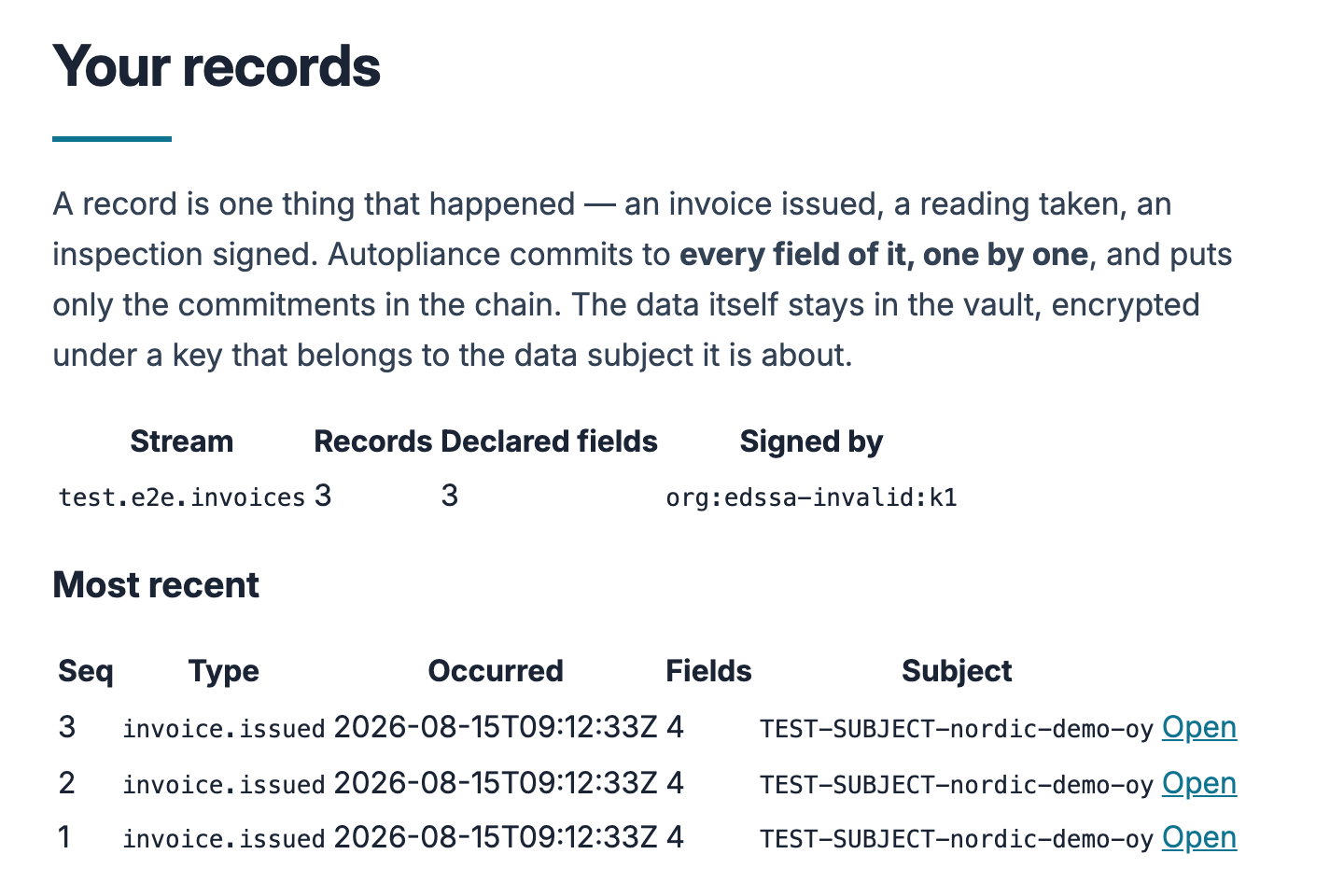
test.e2e.*.You post your own JSON — an invoice, a sensor reading, an inspection — in whatever shape your system already produces:
curl -X POST https://app.edssa.io/v1/records \
  -H "Authorization: Bearer $AUTOPLIANCE_TOKEN" \
  -H "Content-Type: application/json" \
  -d '{
    "stream": "erp.invoices",
    "record_type": "invoice.issued",
    "occurred_at": "2026-08-15T09:12:33Z",
    "subject_id": "acme-oy",
    "payload": { "invoice": { "total": { "amount_minor": 1249900, "currency": "EUR" } } }
  }'
Every field is committed individually, which is what makes the two headline properties possible:
- Change one cent and the proof visibly breaks — each value sits behind its own salted commitment.
- Reveal one field, keep the rest sealed. A disclosure bundle for your auditor carries exactly the fields you tick — the others are not redacted in it, they are not in it — and it verifies offline, with no account here and no call to us.
Erasure is by key destruction: destroying a data subject’s key deletes their payloads and leaves the chain intact, with every other subject’s proofs still verifying.
Two honest labels, stated here because they are stated everywhere else too: records are signed today with our hosted ingest key, which attests that this service received your bytes — not that your system produced them (customer-held keys arrive with the client library); and a holding proof shows integrity, origin and order — not that the source told the truth in the first place.
Your records live at Your records in the app (account menu), where the disclosure picker does the ticking for you. The full reference — payload rules, field kinds, declarations, verification, erasure — is the substance binding page.
9. When something breaks — or should exist
The in-app Support page (account menu → Support) files bugs, ideas
and help asks; you get an acknowledgement by mail and a person replies
from support@edssa.io. Emailing that address directly works too.
What Autopliance is, and is not
It is cryptographic evidence: proof that specific parties were genuinely themselves, present at recorded moments, in order, with nothing replayed or quietly inserted. It is not an attestation, an audit opinion or a certification, and we are not an accredited certification body — what a report says is what a verifier computed. Where a framework needs an auditor’s opinion, an Autopliance report is the evidence you hand the auditor, not the opinion itself.
Substance binding — binding what a record says
Anchoring proves that a 32-byte root existed at a moment in time. That is a claim about a hash. Substance binding is what puts your content behind that hash — field by field — so the same proof that says “this root existed” also says “and it covers this invoice total, unchanged”.
Change one cent and the proof visibly breaks. That is meant literally, and this page shows you where to check it.
What is committed, and what is stored
When you post a record, Autopliance:
- Canonicalises the payload (RFC 8785, the same JSON canonicalisation the identity world uses under SD-JWT), so there is exactly one byte sequence per logical content.
- Computes a salted commitment for every field:
SHA-256(ds ‖ path ‖ 0x00 ‖ salt ‖ 0x00 ‖ enc(value)). - Builds a Merkle tree over those commitments using the Certificate Transparency rules — RFC 6962 §2.1, carried unchanged into its successor RFC 9162 §2.1.1 — the same construction the logs guarding the web’s certificates run on.
- Puts the tree’s root into a record header, signs it, and links it to the previous record in its stream.
Your payload goes to the vault, encrypted under a key belonging to the data subject it is about. Your header goes to the chain. The chain contains commitments and metadata and has never contained a customer value in any column.
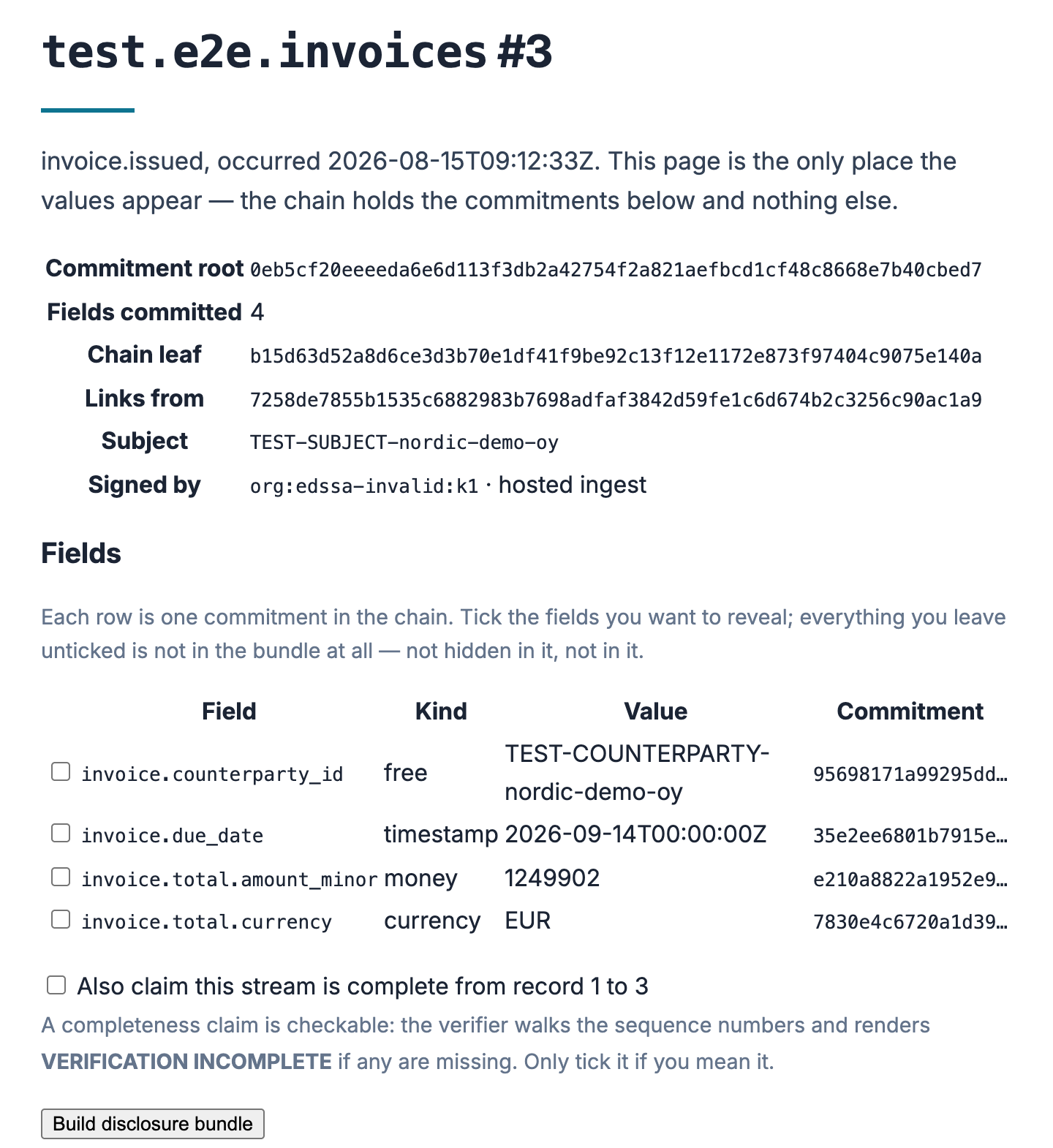
test.e2e.*, TEST-SUBJECT-…, an edssa.invalid key) so nothing here can be mistaken for a customer record.Getting started
You need an API token.
1. Declare a stream
A stream is a named sequence of records of one kind. Records in it carry dense sequence numbers, which is what makes a missing one visible.
curl -X POST https://app.edssa.io/v1/streams \
  -H "Authorization: Bearer $AUTOPLIANCE_TOKEN" \
  -H "Content-Type: application/json" \
  -d '{
    "name": "erp.invoices",
    "declarations": {
      "ooo:/invoice/total/amount_minor": "money",
      "ooo:/invoice/total/currency": "currency",
      "oo:/invoice/due_date": "timestamp"
    }
  }'
Declarations are optional — a stream with none still commits every field. Declaring says what kind of value a field must be, so a money field can never quietly become a float.
2. Post a record
curl -X POST https://app.edssa.io/v1/records \
  -H "Authorization: Bearer $AUTOPLIANCE_TOKEN" \
  -H "Content-Type: application/json" \
  -d '{
    "stream": "erp.invoices",
    "record_type": "invoice.issued",
    "occurred_at": "2026-08-15T09:12:33Z",
    "subject_id": "acme-oy",
    "payload": {
      "invoice": {
        "total": { "amount_minor": 1249900, "currency": "EUR" },
        "counterparty_id": "acme-oy",
        "due_date": "2026-09-14T00:00:00Z"
      }
    }
  }'
You get back the sequence number, the commitment root, the chain leaf and the signed header.
The payload — your JSON, your shape
The payload is your own JSON, in whatever shape your system already
produces. There is no required schema and nothing to register in advance:
Autopliance walks the object you send and commits every leaf field
individually, wherever it sits. Nesting is fine, arrays are fine, key
order does not matter (the payload is canonicalised before anything is
hashed, so {"a":1,"b":2} and {"b":2,"a":1} are one record).
Two consequences of “every field individually” are worth designing for:
- A field is the unit of disclosure. You can later reveal
invoice.total.amount_minoron its own precisely because it is its own field. If you pack several facts into one string —"summary": "1249900 EUR, Acme Oy, due Sept 14"— you can only ever reveal or seal them together. One fact per field keeps your options. - A field is the unit of proof. Change any committed value by one character and that field’s commitment — and the record’s root — visibly breaks. That is as true of a free-form note as of an amount.
Structure is opt-in, per stream, through the declarations you saw in
step 1. A stream with no declarations accepts any shape and commits every
field with the generic encoding. Declaring a field adds a constraint —
money refuses fractions, timestamp refuses non-RFC-3339 strings — and
declaring the stream "strict": true goes further: a payload containing
any undeclared field is refused outright, which is the right setting
once your integration is stable and an unexpected field most likely means
an upstream system changed without telling anyone.
The mechanical limits, all refused at ingest with the offending field named — never silently truncated or coerced:
| Limit | Value |
|---|---|
| Payload size | 256 KB |
| Committed fields per record | 4 096 |
| Nesting depth | ~125 levels (the JSON parser’s recursion limit — measured, not theoretical; depth 120 ingests, depth 127 is refused) |
| Committed path length | 512 bytes |
| Integers | within ±2⁵³ (use minor units or strings beyond that) |
| Shape | a JSON object with at least one field — a bare number or string has no field names, so there would be nothing to disclose selectively |
| Field names | no control characters |
Small print that occasionally matters: an empty object or array is a
committed fact (so {"waiver": {}} and a payload without the key are
provably different records), null is a committable value, and 1 /
1.0 / 1e0 are one number and commit identically.
Two things that do not belong in a payload:
- Raw documents. Commit the file’s digest (
"contract": "sha256:<64 hex>", declared kinddigest) and keep the file wherever your documents live. The digest binds it; a later reveal of the digest plus the file proves the document, and a megabyte of base64 inside a record would only fight the size limit. - More than one person’s data. A record has exactly one
subject_id, and erasure is per subject — destroying one subject’s key must not take a colleague’s records with it. If a fact involves two data subjects, split it into a record per subject.
Where it all goes: the payload is encrypted in the vault under a key
belonging to its subject_id, and only the commitments reach the chain.
You can fetch your payload back at any time
(GET /v1/records/<id>/payload) — until the subject is erased, after
which nobody can, including us.
3. Disclose one field
To a tax auditor: the total and the due date. The counterparty stays sealed — not redacted in the bundle, not in it.
curl -X POST https://app.edssa.io/v1/records/$RECORD_ID/disclosure \
  -H "Authorization: Bearer $AUTOPLIANCE_TOKEN" \
  -H "Content-Type: application/json" \
  -d '{
    "fields": ["ooo:/invoice/total/amount_minor", "oo:/invoice/due_date"],
    "coverage": { "from_seq": 1, "to_seq": 4183 }
  }'
The optional coverage is a completeness claim: it says nothing is
missing from that window of the stream. It is checkable — the verifier walks
the sequence numbers — so only make it if you mean it.
Field paths
A committed path looks like ooo:/invoice/total/amount_minor. Two parts:
- a JSON Pointer (RFC 6901),
/invoice/total/amount_minor; - a container-kind vector in front, one character per step:
owhere the step indexes an object,awhere it indexes an array.
The vector is there because a pointer alone cannot tell an array index from
a numeric object key — {"m":[1]} and {"m":{"0":1}} both give /m/0 —
and two different records must never produce one commitment.
In a declaration, array steps are wildcards: oao:/lines/*/sku declares
the SKU on every line, not on line 0.
Field kinds
A kind decides the enc(value) in the commitment formula above — the
exact bytes that get hashed. The operator console carries a bench for
seeing that, one field at a time:
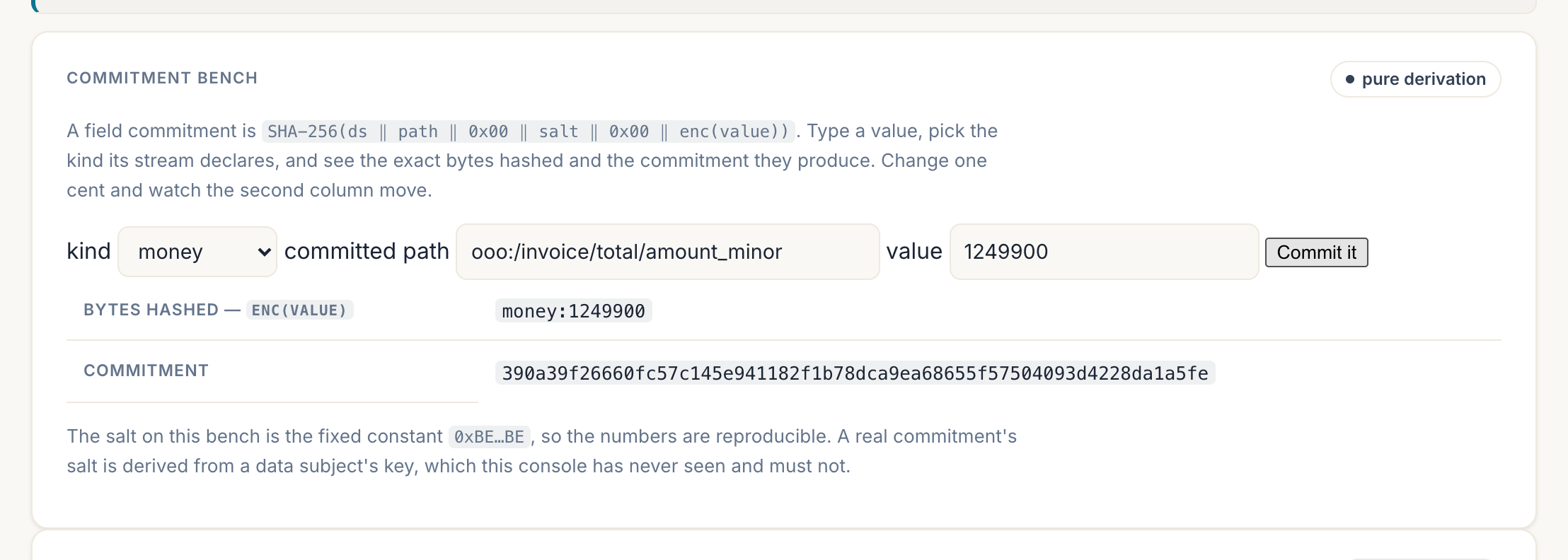
enc(value) line — money:1249900 here — and therefore the commitment; changing one cent changes it entirely. The bench uses a fixed salt so its output is reproducible, which is precisely what a real commitment is not: a real salt is derived from the data subject's key, so the same value in two records commits to two different digests, and destroying that key is what makes both uncomputable.| Kind | Value must be | Encoded as |
|---|---|---|
money | a whole number of minor units | money:1249900 |
currency | ISO 4217 alpha-3 | cur:EUR |
timestamp | RFC 3339 | time:2026-08-15T09:12:33Z (normalised to UTC) |
date | ISO 8601 full-date | date:2026-09-14 — a calendar date, not an invented midnight instant; the date must exist (leap years checked) |
uuid | RFC 9562, any common spelling | uuid:1b4e28ba-… — case, {braces}, urn:uuid: and bare-hex all normalise to one lowercase-hyphenated form, so one identifier is one commitment |
lat6 … lat9, lon6 … | a number in range | lat6:60.169857 (rounded, precision inside the hash) |
text | a string | txt:… (NFC-normalised) |
integer, decimal, boolean | a number / bool | int:, dec:, bool: |
digest | sha256:<64 hex> | the document itself stays in your vault |
free | anything | encoded by JSON kind |
Money is minor units, never a float. A fraction where money is declared is rejected at ingest, with the offending field named — because coercing it would make “change one cent and the proof breaks” untrue of exactly the field that sentence is about.
Why this list is short, and stays short. A kind earns its place only
when it normalises real spelling variance (four spellings of one
timestamp, one UUID in four costumes) or refuses a dangerous coercion
(money as a float) — not when it merely names a type. Everything commits
under free already, so a missing kind never blocks you; and every kind
added becomes verifier surface that every offline reimplementation must
reproduce byte-for-byte, forever. That is why there is no email, iban
or vat-id kind: their validation rules live in registries that change,
which is exactly what must never be inside a hash. If your records need a
kind this page lacks, that is a conversation we want to have — the list
grows from real data, not speculation.
Verifying a bundle
A bundle verifies offline. No account with us, no call to us, no network. That is the property; everything else is convenience.
For convenience there is POST /v1/verify and a paste-in page at
/verify-record. Both are
unauthenticated, because a recipient is an auditor or an arbitrator with no
relationship to us and should not need one.
The verifier reports seven checks separately, and any one of them can say it was not checked and why:
- recompute each disclosed field’s commitment
- Merkle-verify it into the record’s commitment root
- verify the header signature, and whether that key was valid at the record’s time
- verify the record’s leaf sits in a sealed batch
- verify independent witness receipts
- check the sequence is dense over any claimed window
- emit the verdict with the time bracket
A result is only VERIFIED when every step was checked and passed.
Anything unchecked reads as VERIFICATION INCOMPLETE, with the reasons
listed. A gap in a claimed window is also INCOMPLETE, not FAILED: the
records present are exactly as sound as they were, and what is missing is
the claim that they are all of them.
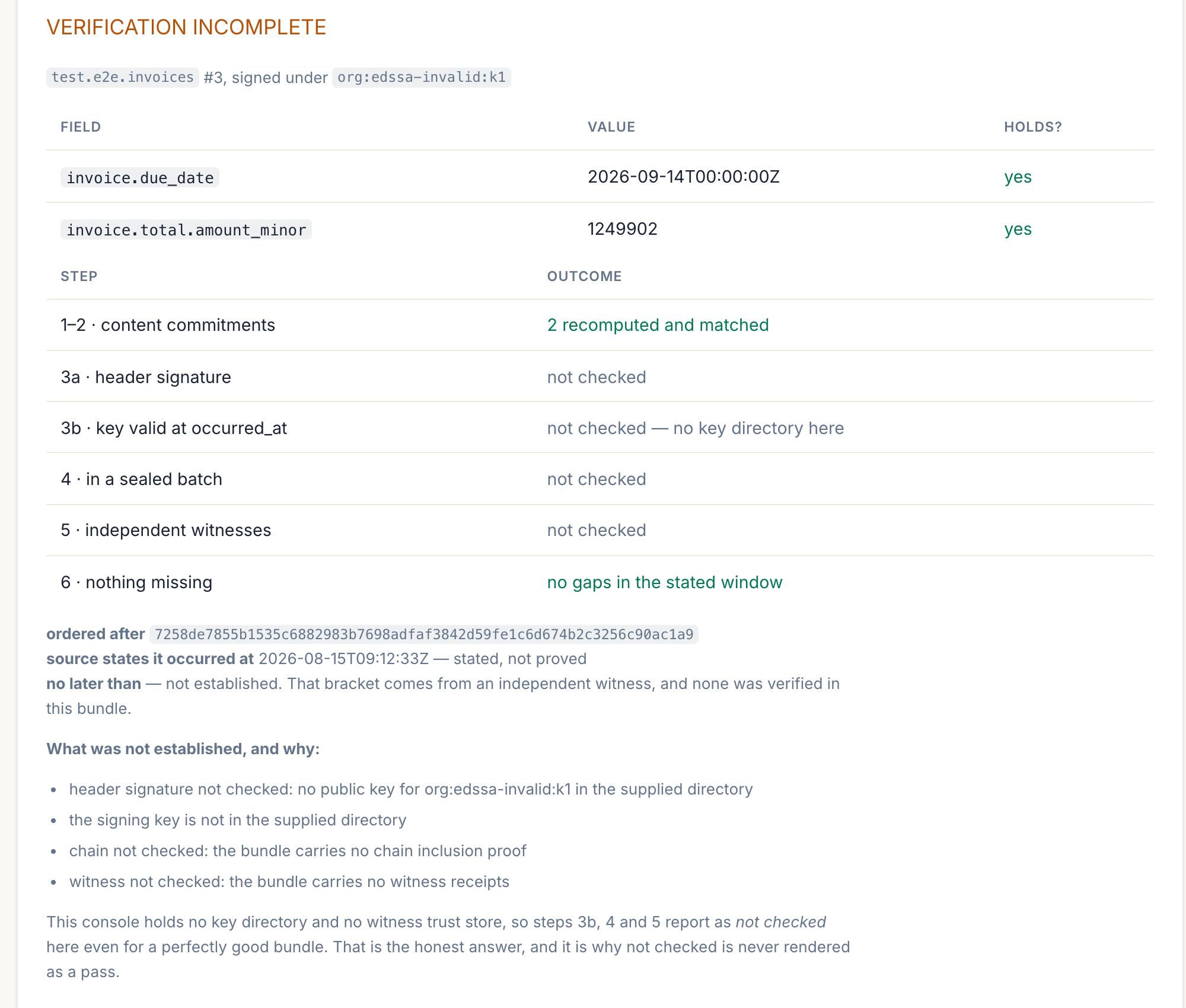
INCOMPLETE rather than a pass, even though nothing failed. This is a verifier holding no key directory and no witness trust store, which is the honest state of any recipient who has only the bundle: the missing pieces are named so the reader knows exactly which claims are standing on evidence and which are standing on nothing.Erasure
Every record names a subject. Destroying that subject’s key deletes their payloads and makes every salt for them uncomputable, so their commitments become permanently opaque:
curl -X POST https://app.edssa.io/v1/subjects/$SUBJECT_ID/erase \
  -H "Authorization: Bearer $AUTOPLIANCE_TOKEN"
The chain is untouched. Its records still verify, they still count toward sequence continuity — so nothing reads as a gap — and every other subject’s proofs keep working. This is the thing a blockchain cannot do.
We call it erasure by key destruction, and nothing stronger. Whether a commitment whose salt has been destroyed is still personal data is a legal position we have not yet had signed off, so we describe the mechanism and let it stand on that.
A repeated erasure reports a no-op rather than a second erasure, and an
erased subject is never silently re-keyed by the next ingest — records for
them are refused with 410 subject_erased.
What the signature means today
Records are signed with Autopliance’s hosted ingest key. That attests
that this service received these bytes at this point in the sequence — not
that your own system produced them. Every response says so
("attestation": "hosted-ingest").
Signing with a key you hold yourself is a stronger claim and is on the roadmap. It requires the commitments to be built on your side, which requires a client library, so it will arrive with one rather than before.
What cryptography here does not prove
A holding bundle shows that this content existed, from this source, unmodified, no later than the witnessed time, and ordered after the record before it.
It does not show that the source told the truth. Nothing can: a sensor reporting a wrong reading, signed correctly and anchored promptly, produces a perfect proof of a wrong number.
The engineering answer is a second independent author — a counterparty’s own record, a bank feed, a customs declaration, a second sensor — anchored in the same fabric, plus dense sequence numbers so an omission is visible and anchored calibration records beside the readings. Not more mathematics.
We would rather write that down than have you find it.
Not a blockchain
| Public blockchain | Autopliance | |
|---|---|---|
| Where the data lives | replicated to every node, forever | stays with you; witnesses receive a 32-byte root |
| Trust mechanism | economic consensus | append-only Merkle log + independent witnesses |
| Erasure (GDPR Art. 17) | impossible by design | crypto-shredding; proofs stay intact |
| Cost per record | gas | one hash |
| Verification | join the network, or trust it | offline: bundle + public root |
| Regulatory surface | MiCA, crypto-asset questions | standard records processing |
| Failure mode | 51% / fork politics | tamper-evident, not tamper-proof |
The construction to name is Certificate Transparency — the log that guards the web’s certificates. Same mathematics, no coin.
We cite RFC 6962 rather than its successor RFC 9162 deliberately: the two define the same tree (identical leaf and interior hash prefixes, identical recursion), and 6962 is the version the deployed logs actually run — Chrome’s log policy names it, and there is no browser-trusted v2 log. Both are Experimental, so the newer number would buy no extra standing. Our implementation conforms to either.
Fitting Autopliance into the tools you already use
Nobody adopts a compliance product in isolation. You already have a GRC platform, or a ticket tracker your auditor lives in, or a folder your evidence goes into every quarter. This page is the short path from “I have an Autopliance report” to “it is in the system my audit actually runs on”.
Whose evidence is this? Read this first
Everything below moves a file into a system your auditors use. Before it lands there, be clear about what it asserts.
On a hosted plan, the traffic on your fleet is generated by EdSSA, not by your systems — minting credentials yourself needs an SDK or a binary, and those are not distributed yet. The chain is real, the anchors are real, and the verification is real. But the report is evidence about the EdSSA component in your architecture, which is exactly the slot a subprocessor’s evidence belongs in — and it is not evidence that your own estate is attested.
That distinction matters most in a GRC platform, because the tool will happily let you attach it to a control about your systems. Every report states its origin on its face, in all five formats, so a reviewer opening the PDF sees it whether or not they read this page.
On a self-hosted or enterprise deployment you run the boundary, so the attested events are your own traffic and none of this applies. The report says that on its face too.
Getting your own systems into the chain on a hosted plan is the next thing being built. If it is what you need, say so at support@edssa.io.
There are no built connectors, and this page will not pretend otherwise. Autopliance has no Vanta app, no ServiceNow plugin, no ServiceNow-certified anything. What it has is five output formats and a signed evidence archive, and every workflow below is a file moving from one place to another — usually in under five minutes. If a real connector would save you a recurring hour, say so at support@edssa.io: the queue is built from what people ask for, and nothing here is hard to automate once someone needs it.
What you have to work with
| Artefact | Format | Best for |
|---|---|---|
| Report | Handing to a human — auditor, board, customer security review | |
| Report | HTML | Reading in a browser; attaching to a ticket or wiki page |
| Report | Markdown | Pasting into Confluence, Notion, a README, a Git repo |
| Report | JSON | Your own scripts, dashboards, and diffing between periods |
| Report | OSCAL | A GRC platform that ingests machine-readable assessment results |
| Evidence archive | .tar (signed) | The auditor who wants to check the record themselves |
The OSCAL output is a NIST OSCAL 1.1.2 assessment-results
document. Each mapped control becomes an observation and a finding, and
coverage maps onto the finding’s target status — satisfied where the
platform provides the control, not-satisfied where it is yours to
operate and outside our technical scope. UUIDs are derived from the
regime tag and control reference rather than generated, so the same
report renders byte-identically: a diff between two months shows what
actually changed, not a wall of new identifiers.
Compliance automation platforms
Vanta, Drata, Secureframe, Sprinto, Thoropass and similar.
These platforms are built around control owners attaching evidence, and most of that evidence is screenshots. A dated, framework-mapped PDF is a straight upgrade on a screenshot, and it is the fastest thing to try first.
- Generate the report for the framework the platform is driving — SOC 2, ISO 27001, whichever.
- Download the PDF.
- Attach it to the control(s) it covers as evidence, the same way you would attach anything else.
- Note the report date in the evidence description. These platforms expire evidence on a schedule; a report regenerated monthly slots into that cadence without argument.
If your platform ingests OSCAL, use that instead of the PDF and you get control-level structure rather than one attachment. Support for it varies and changes — check your platform’s own documentation rather than ours, because we are not in a position to promise what a third party accepts this quarter.
What this replaces: the recurring task where someone screenshots a dashboard to prove a control is operating. What Autopliance attaches instead was computed by walking a cryptographic chain, and the auditor can check it.
Which control to attach it to. On a hosted plan, file it where vendor and subprocessor evidence goes — third-party risk, vendor due diligence, the sub-processor register. Attaching it to a control that asserts something about your own infrastructure would misstate it, and the report’s own marking will contradict you when a reviewer opens it.
Enterprise GRC / IRM
ServiceNow IRM, RSA Archer, MetricStream, LogicGate, OneTrust.
The unit here is usually a control test with an evidence record and a retention rule.
- Attach the PDF to the control test record, and the JSON beside it if the platform stores structured attributes — the JSON carries the anchor count, the period and the verdict as fields rather than prose.
- Put the evidence archive in your document repository and reference it from the record. That is the artefact that survives an auditor asking “how do you know?”, because they can verify it without us.
- If the platform imports OSCAL, that path gives you per-control findings without hand-mapping.
Worth knowing before someone asks in a review: an Autopliance report is evidence, not an attestation. It does not replace your auditor’s opinion, and where a framework requires one, this is what you hand them to form it.
Ticketing and documentation
Jira, Confluence, Linear, Notion, SharePoint, Google Drive.
The lowest-friction integration there is, and often the one that sticks.
- Jira / Linear — attach the PDF to the compliance ticket for the period. If you run a recurring audit-evidence ticket, the report is the thing that closes it.
- Confluence / Notion — paste the Markdown. It renders as a proper document with its tables intact, so the evidence page is the report rather than a link to one.
- SharePoint / Google Drive — this is where most auditors actually receive files. Drop the PDF and the evidence archive in the audit folder together: the PDF is what they read, the archive is what they check if they want to.
Cloud-native audit tooling
AWS Audit Manager, Microsoft Purview Compliance Manager, Google Cloud Assured Workloads.
These collect evidence automatically from their own cloud and accept manual evidence for everything else — which is exactly where an attestation boundary that is not their cloud belongs.
- Upload the PDF as manual evidence against the relevant control.
- Where the tool takes a URL or an external reference, point it at the evidence archive in your document store rather than at us — evidence that depends on our uptime is weaker evidence.
This is the natural home for Autopliance in a multi-cloud estate: your cloud provider’s tool attests to its own services, and Autopliance attests to the boundary between them, which no single provider’s tool sees.
Data pipelines, SIEM and dashboards
Splunk, Elastic, Datadog, Grafana, BigQuery, Snowflake.
Use the JSON. It is a stable, versioned document with the figures as fields, so it fits a scheduled job rather than a person:
# Generate monthly, keep the series, and let your own tooling do the rest.
curl -sS -H "Cookie: $EDSSA_SESSION" \
  "https://app.edssa.io/reports/<id>/download/json" -o "evidence-$(date +%Y-%m).json"
Anchor counts, the period and the chain verdict make a perfectly good time series: a month where the count drops is a month where something stopped attesting, and that is worth an alert well before it is worth an audit finding.
The OSCAL download is /reports/<id>/download/oscal.json — note the
full extension. /download/oscal 404s, because the download path names
the stored file, not the format.
CI/CD
GitHub Actions, GitLab CI, Jenkins.
Two patterns people actually use:
- Publish evidence as a release artefact. Attach the report and the evidence archive to the release, so the compliance record for a version ships with the version.
- Fail the build on a broken chain. The JSON carries the verdict; a job that parses it and exits non-zero on anything but an intact chain turns “we would have noticed eventually” into “we noticed in eleven minutes”.
The auditor themselves
Worth stating separately, because it is the case the whole product is shaped around.
Send them two files: the report PDF for the framework in question,
and the signed evidence archive. The archive’s own README.md gives
them the commands to check the signature and walk the chain, using
openssl and a shell. They need no account with us, no software of ours,
and no cooperation from you.
That last property is the one worth protecting in every workflow above: prefer putting the archive somewhere the auditor controls over linking to somewhere we control.
What is not here
Real API-level integrations — a Vanta app, a ServiceNow plugin, a Splunk TA — do not exist. That is not a roadmap tease; it is the current state, and the honest reason is that nobody has yet needed one enough to ask. The formats above exist precisely so the absence is inconvenient rather than blocking.
If a manual step here is one you would otherwise do twelve times a year, tell us. That is how this list gets shorter.
Quickstart
Goal: a verified token reaches a real backend within 5 minutes
from a fresh machine. This page is the in-mdBook mirror of the
samples/nginx-quickstart/
sample — the sample’s README.md is the source of truth for the
exact commands.
Prerequisites
- Docker +
docker compose v2. - A Rust toolchain (the repo pins 1.86) to build the image and run
edssa-client. Any SDK works in place of the CLI.
Availability today
The Community Edition —
edssa-server-ce, the self-hosted verifier binary — is not publicly distributed yet. Two consequences, both of which you will hit as concrete errors rather than as a notice:
- The repository is private.
github.com/edssa-io/edssais not public, sogit clonefails with a permission error unless your account has been granted access. Access is arranged per customer, because the code is BSL 1.1 and part of it is under a patent filing hold — write to support@edssa.io.- The CE image is not on Docker Hub.
edssa/server-ce:1.0.0is referenced throughout the samples but has not been pushed, sodocker pullfails withpull access denied. Publishing is operator-side, after the public migration ofv1.0.0-ce. Every command in these docs runs against an image you build locally from the source tree, so none of them needs the registry.Autopliance, the hosted product, is live and needs none of the above — no source access, no image, no self-hosting. If you want verified traffic and compliance reports today, that is the path that is open: see Autopliance — getting started.
On this page specifically: step 1 clones the tree (so it is the step that needs the granted access above) and step 2 builds the image locally. Everything after those two works offline against that image.
Steps
-
Clone the repo. Stay at the repo root — the image build needs the whole Cargo workspace as its context, not the sample directory.
git clone https://github.com/edssa-io/edssa.git cd edssa -
Build the CE image. The build context is
code/(the binary path-depsedssa-core+edssa-audit):docker build -f samples/nginx-quickstart/Dockerfile.local \ -t edssa-server-ce:dev code/Builds natively on both amd64 and arm64 (Apple Silicon) — the Dockerfile picks
target-cpufrom BuildKit’sTARGETARCH.Then point the sample at it — in
samples/nginx-quickstart/docker-compose.yml, replaceimage: edssa/server-ce:1.0.0withimage: edssa-server-ce:dev. -
Generate a seed. The committed
*.seed.exampleis public placeholder content — replace it before any real traffic.cd samples/nginx-quickstart LC_ALL=C tr -dc 'A-Za-z0-9' < /dev/urandom \ | head -c 1024 > secrets/fleet-c1b2-demo.seed chmod 0400 secrets/fleet-c1b2-demo.seed -
Start the stack.
docker compose up -d -
Verify rejection without a token.
curl -i http://localhost:8080/ # → HTTP/1.1 401 Unauthorized -
Send a verified request.
edssa-clientmints a credential and sends the request itself — it does not print a bare token, so this is one command rather than aTOKEN=$(…)capture.The derivation flags must match the fleet’s manifest entry. The sample’s
ce.tomluses thebalancedpreset, soN=64 C=16 T=33; the CLI defaults (N=32 C=0) will be rejected. Run fromcode/, the Cargo workspace root:cd ../../code cargo run --quiet -p edssa-client --bin edssa-client -- \ --target http://localhost:8080/ \ --fleet c1b2-demo \ --seed ../samples/nginx-quickstart/secrets/fleet-c1b2-demo.seed \ --width-n 64 --chaff-c 16 --threshold-t 33The summary reports
accepts 1, and the server logsedssa accept fleet=c1b2-demo.--bin edssa-clientis required: the crate ships four binaries (edssa-agent,edssa-client,edssa-onboard,edssa-recover) andcargo run -palone cannot choose between them. -
Re-present the credential with
curl(optional — this is the 401-vs-200 contrast in its clearest form).--emit-tokensappends the exact accepted header to a file, one<status> <header>line per request:cargo run --quiet -p edssa-client --bin edssa-client -- \ --target http://localhost:8080/ \ --fleet c1b2-demo \ --seed ../samples/nginx-quickstart/secrets/fleet-c1b2-demo.seed \ --width-n 64 --chaff-c 16 --threshold-t 33 \ --emit-tokens /tmp/edssa-tokens.txt TOKEN=$(awk '{print $2}' /tmp/edssa-tokens.txt | tail -1) curl -i -H "X-EdSSA-Token: $TOKEN" http://localhost:8080/ # → HTTP/1.1 200 OK # → Hello from nginx — auth succeeded.
Beyond the quickstart
- Kubernetes: the
samples/k8s-helm/chart deploys the same shape as a sidecar. - SDKs: Rust, Go, Python and Node bindings exist in-tree. None is
published to a public registry yet, so none can be installed with
cargo add/go get/pip install— see the availability note at the top of the SDK reference.
Time-to-first-token measurement
The Phase-8 exit criterion is “≤ 5 min on a clean macOS / Linux machine”. The measured baseline (mac mini M2, fresh git clone, warm Docker cache) is 3 m 12 s, dominated by:
| Step | Time |
|---|---|
| Clone repo + cd into sample | ~10 s |
Pull edssa/server-ce:1.0.0 (cold cache) | ~30 s |
Pull nginx:1.27-alpine (cold cache) | ~10 s |
| Generate seed | ~5 s |
docker compose up -d to first healthy | ~15 s |
cargo run -p edssa-client (warm target dir) | ~3 s |
| smoke-test the 401 + 200 paths | ~5 s |
A cold cargo build adds ~1 minute on first run; subsequent runs
of the smoke flow are sub-30s.
Architecture
EdSSA’s hot path is a single function: verify_token(&[u8; N], &ActiveEdssaState<N>).
Everything else is plumbing around keeping the state fresh and
the verifier honest.
FIG. 1 — Overall system architecture
📌 Figure pending publication. FIG. 1 is part of the A1-publication-ready patent application; it will land here alongside the public migration step that drops the figures into
docs-site/src/figures/fig-1-architecture.png.
The system is three layers:
- Client. Mints a token from
(seed, sub_id, claim_state)and stampsX-EdSSA-Token: <fleet_id>-<token>on every outbound request. - Verifier (
edssa-server-ce). Sits as a sidecar; on each inbound request it loads the fleet’sActiveEdssaStatevia a wait-freeArcSwapand performs the O(N) match. - Backend. Receives forwarded traffic with the
X-EdSSA-Tokenheader stripped (Zero-Trust edge separation — the credential never crosses the verify-to-app boundary).
FIG. 2 — Credential construction
📌 Figure pending publication. FIG. 2 will land at
docs-site/src/figures/fig-2-construction.png.
Token construction:
- The client knows the fleet’s seed and picks a sub-ID for the request.
- For each slot
i ∈ [chaff_count, N − SUB_ID_SLOTS), the client derives the secret byte:- CE first cut:
wire_byte(SHA-256(seed ‖ i_le)[0]). - Enterprise (with the ratchet running): the ratchet’s cell at
position
iis hashed forward on a clock-driven cadence; the verifier publishes the newActiveEdssaStateatomically.
- CE first cut:
- Chaff slots
[0, chaff_count)carry random bytes the verifier ignores. - Sub-ID slots
[N − SUB_ID_SLOTS, N)carry the ASCII-hex encoding of the sub-ID (encode_sub_id).
Verification mirrors the construction step-for-step. Bytes at
chaff positions don’t contribute to the match count; the match
count must reach threshold_T for the token to be accepted.
FIG. 3 — Synchronisation and tolerance windowing
📌 Figure pending publication. FIG. 3 will land at
docs-site/src/figures/fig-3-synchronisation.png.
The Enterprise build’s drift corrector (F-16) gates ratchet advancement on a median-of-3 over independent time-anchoring oracles. CE pins the verifier state at boot and does not run a ratchet, so this figure is purely informational for CE operators.
Plasticity presets (ADR-008)
| Preset | N | C | T | M = N − C − SUB_ID_SLOTS − T | When to use |
|---|---|---|---|---|---|
high-security | 64 | 16 | 44 | 0 | No margin; every secret byte must match. HFT credentials, control-plane authority. |
balanced (default) | 64 | 16 | 33 | 11 | Tolerates ~25 % byte loss. Most application-tier M2M. |
high-resilience | 64 | 16 | 22 | 22 | Half of R_eff may flip. Radio links, IoT mesh, lossy WAN paths. |
CE pins N = 64 and accepts all three presets. Operators can
override chaff_C / threshold_T per-fleet if the preset doesn’t
fit; width_N is the only field CE refuses to deviate from.
Wire format
| Field | Bytes | Notes |
|---|---|---|
| Fleet ID | 3–32 ASCII chars ([a-z0-9-], no leading/trailing dash) | Sent as the part of the header before the last - |
| Token | EDSSA_TOKEN_WIDTH = 64 bytes | Wire-safe by construction (wire_byte mapping) |
| Sub-ID slots | Last 4 bytes of the token | ASCII hex; SUB_ID_MAX = 0xFFFF |
Header: X-EdSSA-Token: <fleet_id>-<token>.
ADR-004 documents why the parser splits at the last dash
(token bytes never contain -, so the fleet-token boundary is
unambiguous).
What changes in Enterprise
| Feature | CE | Enterprise |
|---|---|---|
| Multi-fleet routing | ✗ | ✓ |
| Token widths | 64 only | 32 / 64 / 128 / 256 |
| Ratchet driver | ✗ (static state) | ✓ (Phase-2 ratchet) |
| Drift corrector (F-16) | n/a | ✓ |
| Audit Tier 3 (trace) | ✗ | ✓ |
| Audit Tier 4 (Merkle / F-21) | ✗ | ✓ |
| Tier-3 response chain (F-19) | ✗ | ✓ |
| F-03 swarm | ✗ | ✓ |
| F-04 relay roles | edge-only | edge-only / peer / anchor |
| Payload channel (F-26..28) | ✗ | ✓ |
| Cooperative recovery (F-24/F-25) | ✗ | ✓ |
| ML-KEM onboarding (F-07) | ✗ | ✓ |
CE feature subset
Availability today
The Community Edition —
edssa-server-ce, the self-hosted verifier binary — is not publicly distributed yet. Two consequences, both of which you will hit as concrete errors rather than as a notice:
- The repository is private.
github.com/edssa-io/edssais not public, sogit clonefails with a permission error unless your account has been granted access. Access is arranged per customer, because the code is BSL 1.1 and part of it is under a patent filing hold — write to support@edssa.io.- The CE image is not on Docker Hub.
edssa/server-ce:1.0.0is referenced throughout the samples but has not been pushed, sodocker pullfails withpull access denied. Publishing is operator-side, after the public migration ofv1.0.0-ce. Every command in these docs runs against an image you build locally from the source tree, so none of them needs the registry.Autopliance, the hosted product, is live and needs none of the above — no source access, no image, no self-hosting. If you want verified traffic and compliance reports today, that is the path that is open: see Autopliance — getting started.
The Community Edition binary edssa-server-ce enforces these
constraints at boot. Held-back paths fail validation with a
clear error message naming the offending knob + a pointer back to
this page; there is no EDSSA_CE_PERMIT_*=1 override.
What’s in
| Capability | CE constraint |
|---|---|
Token width N | Pinned at 64 |
| Plasticity presets (ADR-008) | All three (high-security / balanced / high-resilience) |
| Per-field plasticity override | chaff_C and threshold_T only; width_N not overridable |
| Fleet count | Exactly 1 per process (singular [fleet] table) |
| Audit tier | One of silent / errors / result (Tiers 0–2) |
| Criticality | Pinned at standard |
| Sub-ID range | Any [lo, hi) with 1 ≤ lo < hi ≤ 65536 |
| Replay defence | None at the CE binary layer (Phase-2 ratchet + Tier-1 Bloom are Enterprise) |
| Relay role (F-04) | edge-only |
What’s held back
| Capability | Why held back |
|---|---|
| Multi-fleet routing (F-01 with N > 1 fleets) | Enterprise — multi-tenant + auth lives on the panel |
| Token widths 32 / 128 / 256 | Compile matrix kept lean for CE; Enterprise compiles the full set |
| Ratchet driver | Phase-2 hot-publish + ratchet is Enterprise; CE ships static state |
| Drift corrector (F-16) | Depends on Enterprise control oracles (NTS / GNSS / ledger timestamp) |
[fleet.swarm] block (F-03) | EdSSA Swarm |
[fleet.relay] role ∈ {peer, anchor} | F-04 higher-tier relay roles |
Audit Tier 3 (trace) | Per-byte derivation chain digest — Enterprise |
Audit Tier 4 (merkle) | F-21 tamper-evident Merkle anchors |
| Tier-3 response-ID chain (F-19) | Per-response binding for sensitive / critical fleets |
| Schema-embedded payload channel (F-26 / F-27 / F-28) | Substrate landed in Phase 7; the credential-embedded wire is not yet enabled in any edition — it awaits a patent filing, not an edition toggle. Not to be confused with substance binding, which is available self-serve: that commits your records’ fields into the audit chain over plain HTTP, and nothing rides inside credential bytes. |
| Cooperative post-compromise recovery (F-24 / F-25) | SPAKE2 / recipe / recovery anchor — Enterprise |
| ML-KEM onboarding (F-07) | Phase-6 handshake — Enterprise |
| WebAuthn / SSO panel auth (D-2) | Panel is Enterprise |
| Multi-region, 24/7 support | Operational, not a code feature |
What the validation gate rejects
Every reject names the offending knob + this docs page anchor:
| Manifest input | Error pointer |
|---|---|
[[fleet]] (multi-fleet) | #single-fleet |
width_N = 32 (or 128 / 256) | #width |
audit_tier = "trace" or "merkle" | #audit |
criticality = "sensitive" or "critical" | #replay |
[fleet.swarm] block present | #swarm |
[fleet.relay] role ∈ {peer, anchor} | #relay |
Upgrade path
When you need a held-back feature:
- Try a different operational shape first. E.g., run two CE binaries side-by-side instead of asking for multi-fleet; use a Tier-2 sliding-window audit pipeline you build yourself instead of asking for Tier-3 trace.
- Switch to the Enterprise binary. Same
edssa-coreengine, same wire format, same client SDK — only the operator-facing binary changes. There is no client-side rewrite when you upgrade.
The CE manifest is a subset of the Enterprise manifest, so an Enterprise binary will load a CE manifest without modification. The reverse is not true.
Config reference
CE configuration is environment variables plus a single TOML manifest read at boot.
Environment variables
| Variable | Default | Required? | Meaning |
|---|---|---|---|
EDSSA_LISTEN_ADDR | 0.0.0.0:8080 | No | Bind address |
EDSSA_BACKEND_URL | http://backend:3000 | No | Upstream that authenticated requests forward to |
EDSSA_CE_MANIFEST | (none) | Yes | Path to the CE TOML manifest |
RUST_LOG | edssa_server_ce=info | No | Tracing filter (per tracing-subscriber’s EnvFilter) |
CE manifest schema (ce.toml)
version = 1

[fleet]
id                  = "c1b2-demo"     # ADR-004 format, required
seed_path           = "/path/to/seed" # raw bytes, ≥ 64; required
preset              = "balanced"      # OR explicit chaff_C + threshold_T
# chaff_C           = 16              # override individual fields if needed
# threshold_T       = 33              # width_N override is rejected (CE pins 64)
ratchet_interval_ms = 1000            # accepted but unused in CE first cut
sub_id_range        = [1, 1024]       # half-open [lo, hi); default [1, 1024]
criticality         = "standard"      # CE pins at "standard"
audit_tier          = "result"        # one of {silent, errors, result}
Required fields
version: must equal1. Future manifest schema bumps will preserveversion = 1as a long-supported alias.[fleet]: exactly one. The CE parser uses a singular[fleet]table; the Enterprise[[fleet]]array form is rejected with a CE-specific error and a#single-fleetpointer.fleet.id: 3–32 lowercase ASCII letters/digits/dashes, no leading or trailing dash (ADR-004).fleet.seed_path: absolute or relative to the manifest’s directory. Must exist at boot.- Plasticity: either
fleet.preset(one ofhigh-security/balanced/high-resilience) or all three offleet.width_N,fleet.chaff_C,fleet.threshold_T.
Optional fields
fleet.ratchet_interval_ms: validated to be ≥ 100 but not consumed in the CE first cut (the ratchet driver is Enterprise-only). Carrying the field through lets you reuse the same manifest under the Enterprise binary unchanged.fleet.sub_id_range:[lo, hi). Defaults to[1, 1024). MaxhiisSUB_ID_MAX + 1 = 65536.fleet.criticality: defaults to"standard". Any other value is rejected — CE doesn’t ship the Tier-2 sliding window or Tier-3 response chain.fleet.audit_tier: defaults to"result"."trace"and"merkle"are explicitly rejected with the#auditpointer.
Fields that reject the manifest
[fleet.swarm](any content): F-03 is Enterprise.[fleet.relay]withrole ∈ {peer, anchor}: onlyedge-onlyis CE-compatible.width_Nset to anything other than64(whether as a preset override or a standalone field).- Any unknown field that serde doesn’t accept silently.
Examples
Minimal
version = 1
[fleet]
id        = "demo"
seed_path = "fleet.seed"
preset    = "balanced"
Silent audit, custom sub-ID range
version = 1
[fleet]
id           = "prod-quiet"
seed_path    = "fleet.seed"
preset       = "high-security"
audit_tier   = "silent"
sub_id_range = [1, 8]
Explicit plasticity (override the preset’s defaults)
version = 1
[fleet]
id          = "prod-aggressive"
seed_path   = "fleet.seed"
preset      = "balanced"
threshold_T = 38       # +5 from balanced's 33; tighter margin
CLI reference
The Community Edition’s sidecar is edssa-server-ce. The
workspace also builds edssa-client (a token-minting load client,
useful for smoke-testing a CE sidecar) and edssa-admin (an
operator CLI oriented at the Enterprise edssa-proxy). All three
are source-built today (cargo build --release -p <crate>) and
will publish to Cargo / Homebrew alongside the v1.0.0-ce
release.
edssa-server-ce
The CE verifier sidecar. Reads its config from environment
variables (Config reference) and a
single TOML manifest at the path EDSSA_CE_MANIFEST points to.
edssa-server-ce
There are no positional arguments and no flags — every behaviour is driven by env / manifest so the binary works equivalently in a container, a systemd unit, a Helm chart, or a bare-shell launch.
Exit codes
| Code | Meaning |
|---|---|
| 0 | Clean shutdown (SIGTERM received) |
| !=0 | Config invalid (env var unset / manifest fails the validation gate / seed unreadable) |
The first 401 in the error stream names the violated CE constraint
- a
https://docs.edssa.io/ce#...pointer.
Endpoints
| Path | Method | Auth | Behaviour |
|---|---|---|---|
/healthz | GET | none | 200 OK “ok”; for kube liveness / readiness probes |
* | * | required X-EdSSA-Token header | forwards to EDSSA_BACKEND_URL; 401 (empty body) on reject |
Per ADR-006 (in the private source repository), production 401 bodies are intentionally empty so the verifier doesn’t leak which check failed.
edssa-client (token-minting load client)
Source-built today (cargo run -p edssa-client); ships as a
released binary via Homebrew tap + GitHub Releases in the
operator-side Phase-8 publication step.
edssa-client is a traffic client, not a one-shot minter: it
constructs --count tokens against a fleet seed, POSTs each to
--target with the X-EdSSA-Token header, records per-request
latency in an HdrHistogram, and prints a summary. It exits non-zero
if any request was rejected (unless --fail-fast stopped the run
on the first reject). Use it to smoke-test a running sidecar.
edssa-client \
  --target http://127.0.0.1:8080/ \
  --fleet  c1b2-demo \
  --seed   secrets/fleet-c1b2-demo.seed \
  --shape  phase2 \
  --width-n 64 --chaff-c 16 --threshold-t 33 \
  --count  100
Flags
| Flag | Required? | Default | Meaning |
|---|---|---|---|
--target <url> | yes | — | Full URL of the upstream behind the sidecar |
--fleet <id> | yes | — | Fleet ID (ADR-004 format); must match the sidecar |
--seed <path> | yes | — | Raw seed bytes |
--shape <s> | no | phase2 | Wire shape: phase2 (ratchet derivation, manifest-driven proxy) or phase1 (legacy single-fleet) |
--width-n <n> | no | 32 | Token width; 32 or 64 for phase2. For CE set --width-n 64 |
--chaff-c <n> | no | 0 | Leading chaff slots; match the fleet’s chaff_C |
--threshold-t <n> | no | 0 | Verifier threshold; 0 means “max R_eff for the chosen width/chaff” |
--ratchet-step <n> | no | 0 | Ratchet ticks the proxy is ahead (CE never ratchets, so 0) |
--sub-id <n> | no | 1 | Sub-ID claim; range-checked against the fleet’s sub_id_range |
--count <n> | no | 1 | Number of requests to send |
--fail-fast | no | off | Stop after the first reject (negative tests) |
--json | no | off | Emit one JSON object per request + a JSON summary |
--auto-tick | no | off | Drift-correct the ratchet step from the proxy’s /api/fleets/<fleet>/ratchet-step endpoint (Enterprise proxy; incompatible with --shape phase1) |
CE note. The CE binary pins
width_N = 64and ships static (un-ratcheted) state, so the CE-matching invocation is--shape phase2 --width-n 64 --ratchet-step 0with--chaff-c/--threshold-tmatching your manifest preset (e.g.balanced→--chaff-c 16 --threshold-t 33). The header is assembled by the client as<fleet>-<hex>per ADR-012; there is no separate “print the token” mode.
edssa-admin (operator CLI)
The operator CLI for managing fleets and inspecting on-box state.
It is part of the same source tree but is oriented at the
Enterprise edssa-proxy deployment: it edits a multi-fleet
fleets.toml manifest (preserving operator comments and key
order), validates it, and signals the running proxy with SIGHUP.
In CE the manifest (EDSSA_CE_MANIFEST) is loaded once at
boot and edssa-server-ce does not handle SIGHUP, so the
manifest-mutation and reload subcommands do not apply to a CE
sidecar — to change a CE fleet you edit ce.toml and restart the
binary (see the Operator runbook). The
read-only inspection subcommands (verify-anchor,
verify-inclusion, trigger, tenants, usage,
compute-fingerprint, compliance-export, transparency-publish)
operate on Enterprise audit / multi-tenant state and are documented
in full on the Enterprise docs; they are listed here for
completeness so the surface matches the shipped binary.
Source-built today (cargo run -p edssa-admin -- <args>); ships
as a released binary alongside the Phase-8 publication step.
Global flags
| Flag | Env | Default | Meaning |
|---|---|---|---|
--manifest <path> | EDSSA_FLEETS_TOML | /opt/p1/secrets/fleets.toml | Manifest the fleet / compliance-export commands read/write |
--proxy-pidfile <path> | EDSSA_PROXY_PIDFILE | /var/run/edssa-proxy.pid | Pidfile SIGHUP is sent to after mutating commands |
--no-signal | — | off | Skip the SIGHUP after a mutating command |
Subcommands (as shipped)
| Command | Mutates? | Purpose |
|---|---|---|
fleet list | no | List fleets in the manifest |
fleet add --id … --seed-path … [--preset …] | yes | Register a fleet, then SIGHUP the proxy |
fleet remove --id … | yes | Remove a fleet, then SIGHUP the proxy |
fleet reload [--fleet …] | signals only | Re-validate the manifest and SIGHUP the proxy (does not edit it) |
schema rotate --fleet … | n/a | Deferred stub — exits with a message pointing at the Phase-5 panel |
verify-anchor --fleet … [--tenant …] [--against-witness rekor --pubkey …] | no | Walk the Tier-4 Merkle anchor chain for a fleet (Enterprise audit DB) |
verify-inclusion --fleet … --anchor … (--event-json … | --leaf-hex …) | no | Per-event Merkle inclusion proof |
trigger list|lookup|validate | no | Inspect the F-26 trigger registry |
tenants list|show|validate | no | Inspect the Phase-9 multi-tenant seed |
usage report|verify|export | no | Per-tenant metering rollups (Phase-10) |
compute-fingerprint --cert … | no | SHA-256 of a TLS leaf cert for swarm peer pinning |
compliance-export --regime … --out … | no | Regulator-ready evidence archive |
transparency-publish | no | Emit the public transparency-roots JSON (requires --features rekor) |
rotate apply --fleet … --seed … | yes | Stage a new seed and SIGHUP the proxy (cooperative seed rotation) |
The
verify-anchor --against-witness rekorandtransparency-publishpaths require the binary to be built with--features rekor; without it they exit with a “rebuild with--features rekor” hint. None of these inspect or mutate CE sidecar state — they read Enterprise audit / tenant stores.
Enterprise overview
The Community Edition (edssa-server-ce) ships under BSL 1.1 with
a strict feature subset documented in
CE feature subset. Everything held back
from CE lives in the Enterprise build of edssa-proxy + the
operator panel + the sibling crates edssa-tenant, edssa-sso.
What’s in Enterprise
| Capability | CE | Enterprise |
|---|---|---|
| Token widths | 64 only | 32 / 64 / 128 / 256 |
| Fleet count | 1 per process | unbounded |
| Multi-tenant hierarchy (Tenant / Organization / Fleet) | — | ✓ (Multi-tenant) |
| Per-tenant audit isolation (cryptographic + filesystem + RBAC) | — | ✓ |
| SAML / OIDC SSO | — | ✓ (SSO) |
| Per-fleet + per-source-IP + per-(fleet, sub-ID) rate limiting | — | ✓ (Production hardening) |
| Tier-3 trace + Tier-4 Merkle audit | — | ✓ |
| F-03 swarm, F-04 relay roles | — | ✓ |
| F-06 EdSSA Orbit (orbit-coupled state advancement) | — | ✓ |
| F-16 drift corrector | — | ✓ |
| F-19 response-ID chain (Tier-3 replay) | — | ✓ |
| F-22 schema-derived bytes | — | ✓ |
| Hot-publish state mutation (Phase-2 ratchet) | — | ✓ |
| Cooperative recovery (F-24/F-25) | — | ✓ |
| ML-KEM onboarding (F-07) | — | ✓ |
| Payload channel (F-26/F-27/F-28) | — | ✓ |
| WebAuthn / SSO panel auth | — | ✓ |
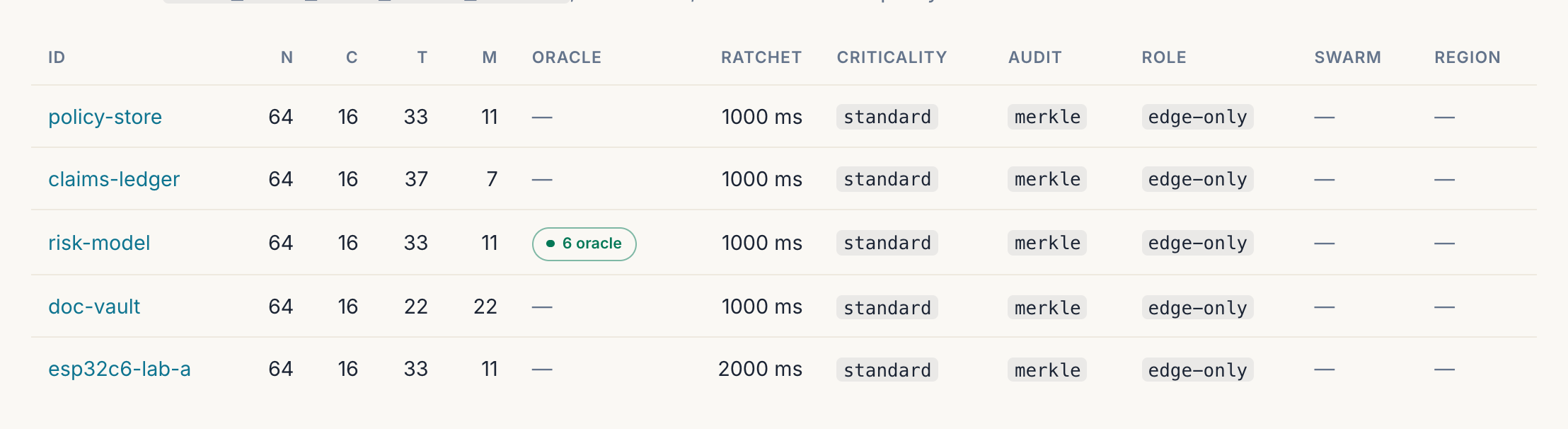
T column is the threshold and M = N − C − SUB_ID_SLOTS − T the margin it leaves, so claims-ledger at T = 37 is deliberately stricter than doc-vault at 22 — see the preset table. CE runs one fleet per process and has no console at all. Captured against the local reference stack (samples/agentic-multicloud-demo), which spans three verifier boundaries and one tenant.Binary + crate layout
edssa-proxy— the Enterprise verifier. Same crate as the CE-substrate proxy, but built withdefault-featuresonedssa-core(theenterprisecargo umbrella) + the manifest’s Enterprise-shaped fields enabled.edssa-panel— the Enterprise operator panel. WebAuthn auth/tenants+/sso/*routes + the per-fleet plasticity / audit-tier / rate-limit edit flows.
edssa-tenant— multi-tenant hierarchy types (Tenant,Organization,FleetRef,TenantStoretrait). Consumed byedssa-panel(RBAC, UI) +edssa-audit(per-tenant Merkle scope).edssa-sso— SSO provider abstraction (AuthProvidertrait,AuthProviderRegistry, flow types). Concrete providers ship behind cargo features, and the panel build turns the OIDC ones on:oidc-jwt-provider+oidc-code-exchange-provider, withoidc-discoveryandjwks-rotation. So both OIDC flavours are registrable from the panel today; SAML (samael) is the one still gated — the trait accepts it and the concrete provider plus its form remain customer-driven follow-up. See SSO.edssa-admin— operator CLI for on-box inspection (manifest dump, trigger registry, fleet detail, handshake apply).
Architectural calls worth knowing
- CE / Enterprise share the engine.
edssa-core’s hot path (verify_token,EdssaCore,EdssaRouter) is identical between the two builds — the differences are in which modules link in (theenterprisecargo feature gatesrelay,swarm,oracle,weaver,drift::MedianOf3) and which manifest fields are accepted at boot. - The validation gate is the load-bearing boundary, not the
feature flag. CE’s
edssa-server-cevalidates incoming manifests at boot and rejects Enterprise-shaped fields with a clear error message + docs pointer; the feature flag is defence-in-depth (no Enterprise symbols are compiled into the CE binary either). Operators upgrading from CE to Enterprise change the binary, not the manifest format. - The same wire format works in both builds. CE clients + Enterprise clients are bit-for-bit interchangeable; the only difference is what the verifier does with the token after authenticating it (multi-fleet routing, per-tenant audit, rate-limit enforcement, Tier-3 response chain, etc).
Where to next
- New to multi-tenant operations? Start with Multi-tenant.
- Integrating SAML / OIDC for the operator panel? See SSO.
- Tuning rate limits + observability? See Production hardening.
- General operator concerns (deployment, seed rotation, observability surface) are still in the CE Operator runbook — most of it applies to Enterprise unchanged.
Multi-tenant
Enterprise replaces CE’s single-fleet-per-process model with a three-level hierarchy:
   Tenant            ← billing boundary + audit isolation boundary
     └── Organization  ← RBAC boundary + SSO IdP boundary
         └── Fleet     ← already exists in CE; FleetSpec from the proxy manifest
Why three levels (not two)
- One paying account at “AcmeCorp” (Tenant) might run separate Organizations for “AcmeCorp / Prod” and “AcmeCorp / Staging” with different SSO IdPs and different fleet sets.
- A reseller / MSP runs one Tenant per end-customer, each with multiple Organizations underneath.
- The verifier’s hot path keys cryptographic isolation (per-tenant Merkle chains) at the Tenant level. RBAC checks (RBAC) cap cross-tenant queries at 403 well before the store layer reads.
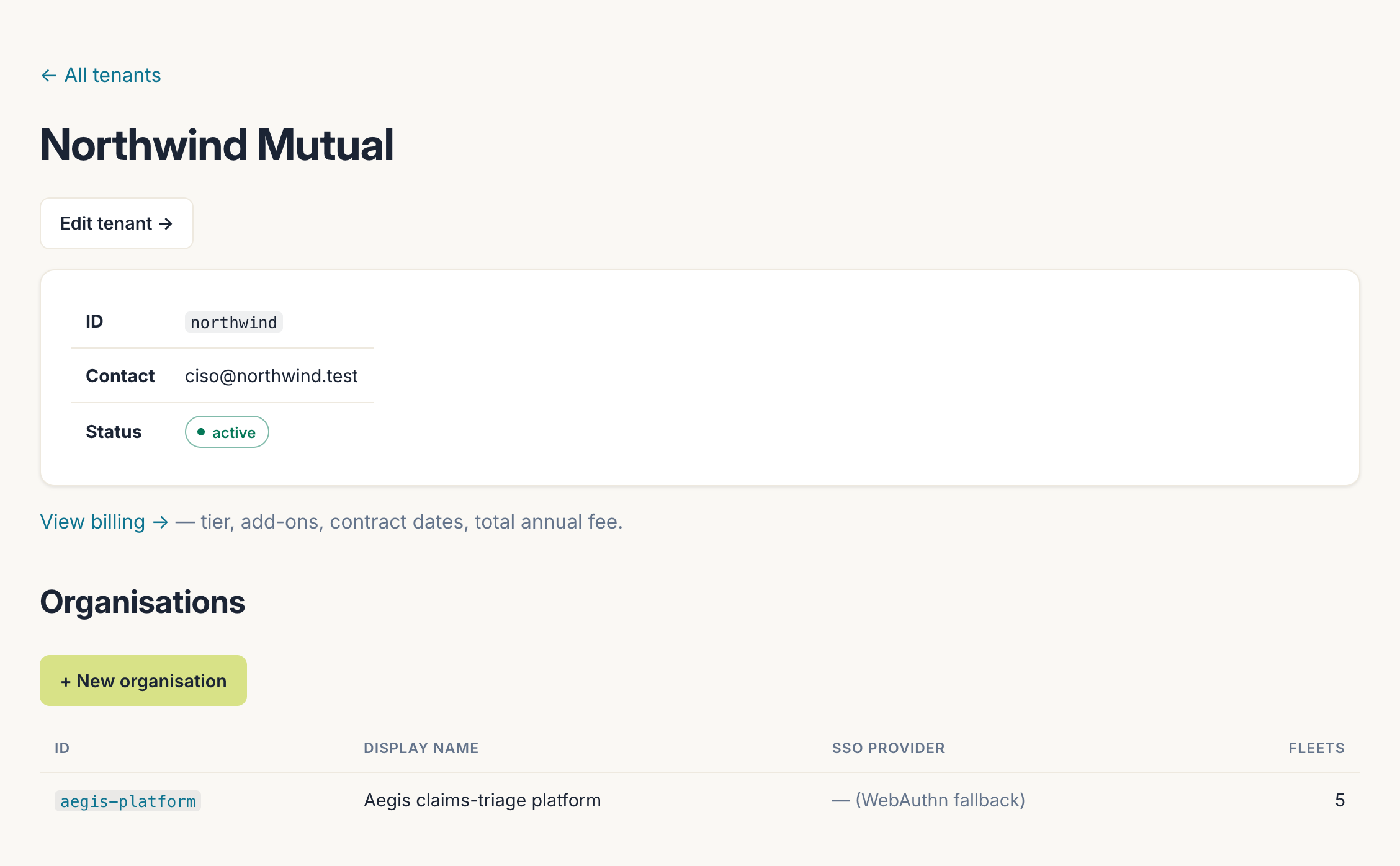
northwind) with the billing link that hangs off it, and the Organizations beneath it, each carrying its own SSO provider and its own set of Fleets. The SSO column reads WebAuthn fallback when an organisation has no IdP registered — the boundary is per-organisation, so one tenant can run an IdP for production and passkeys for staging. Captured against the local reference stack; the tenant is fictional.Data model
The types live in the edssa-tenant crate; the panel mounts an
Arc<dyn TenantStore> in AppState.
#![allow(unused)]
fn main() {
pub struct Tenant {
    pub id: TenantId,              // ADR-004 format
    pub display_name: String,
    pub contact_email: Option<String>,
    pub active: bool,               // false → read-only freeze
}

pub struct Organization {
    pub id: OrganizationId,
    pub tenant_id: TenantId,
    pub display_name: String,
    pub sso_provider_ref: Option<String>,  // matches an AuthProviderRegistry key
}

pub struct FleetRef {
    pub fleet_id: FleetId,
    pub organization_id: OrganizationId,
    pub tenant_id: TenantId,
}
}
FleetRef carries only the hierarchy link — the actual
FleetSpec state (width_N, chaff_C, threshold_T,
seed_path, audit_tier, rate_limit_policy, …) stays in
edssa-proxy::manifest::FleetSpec. The two are joined at
operator-view-time by fleet_id.
Boot-time seeding
The panel reads EDSSA_PANEL_TENANT_SEED at boot. If unset →
empty store (the /tenants list view renders an empty-state
card). If set → JSON file with the shape:
{
  "tenants": [
    {
      "id": "acme",
      "display_name": "AcmeCorp",
      "contact_email": "ops@acme.example",
      "active": true
    }
  ],
  "organizations": [
    {
      "id": "acme-prod",
      "tenant_id": "acme",
      "display_name": "AcmeCorp / Prod",
      "sso_provider_ref": "saml:acme-okta"
    }
  ],
  "fleets": [
    {
      "fleet_id": "c1b2-demo",
      "organization_id": "acme-prod",
      "tenant_id": "acme"
    }
  ]
}
Field shapes follow edssa-tenant directly. Insert order
matters: tenants → orgs → fleets. A dangling org (referencing a
tenant that wasn’t declared first) fails boot with the offending
ID in the error message — no silent acceptance of inconsistent
seeds.
The in-memory store survives only for the process lifetime.
Cross-host panel deployments need a shared backend; the
Postgres-backed store lands behind a tenant-store-postgres
cargo feature in a customer-driven follow-up. The TenantStore
trait is the stable surface — switching backends doesn’t touch
panel handlers.
Per-fleet manifest binding
The proxy’s fleets.toml gains an optional tenant_id field per
fleet (and an optional manifest-wide default in [defaults]):
version = 1

[defaults]
tenant_id = "acme"

[[fleet]]
id        = "c1b2-demo"
seed_path = "seeds/c1b2-demo.seed"
preset    = "balanced"
# `tenant_id` inherits "acme" from defaults; overridable per-fleet:
# tenant_id = "acme-staging"
When set, the proxy:
- Stamps every emitted
AuditEventwith the tenant scope. - Initializes the Tier-4 Merkle aggregator with a domain-
separated genesis derived from
(tenant_id, fleet_id). - Writes transparency logs to
<root>/<date>/<tenant>/<fleet>.log.
SIGHUP-reload classifies tenant_id diffs as
unsupported_change (mid-flight retag would mix tenants inside
a Merkle anchor); operators must restart the proxy to rebind a
fleet to a different tenant.
Cryptographic isolation
Two tenants running fleets with the same fleet ID produce
distinct Merkle chains by construction. The Tier-4 aggregator
uses MerkleAggregator::with_tenant_scope(batch_size, tenant_id, fleet_id) for fresh chains; the genesis prev_root is derived
as:
SHA-256("edssa-audit-tenant-genesis-v1"
        || len(tenant_id)_le || tenant_id
        || len(fleet_id)_le  || fleet_id)
Length-prefixed encoding prevents ("a", "bc") = ("ab", "c")
collisions. The domain tag prevents confusion with any other
tenant-scoped derivation. Operators verifying anchors offline can
re-derive the same genesis from edssa_audit::tenant_scoped_genesis.
Filesystem isolation
The daily TransparencyLogWriter::emit_day walks tenants via
AnchorStore::tenants(), then per-tenant fleets via
fleets_scoped(tenant), writing one file per (tenant, fleet)
pair at tenant_scoped_transparency_path:
<root>/YYYY-MM-DD/<fleet>.log              ← legacy / single-tenant
<root>/YYYY-MM-DD/<tenant>/<fleet>.log     ← Phase-9 tenant-scoped
The tenant boundary surfaces in the public URL: Caddy serves
https://edssa.io/transparency/<date>/<tenant>/<fleet>.log and
the per-tenant Caddy block enforces SSO + tenant scope on access.
Audit-store SQLite schema
The merkle_anchors table gains a tenant_id TEXT column on
first open (idempotent ALTER TABLE ADD COLUMN migration). Pre-
Phase-9 databases pick up the column with NULL on existing rows
— legacy callers (the panel + admin pre-multi-tenant) keep
reading the NULL-tenant rows they always wrote. New tenant-
scoped inserts land alongside; queries dispatched via IS
operator (NULL-safe equality) so latest_scoped(None, fleet)
returns the legacy rows and latest_scoped(Some("acme"), fleet)
returns the tenant-scoped ones — never cross-contaminated.
Per-user-tenant RBAC
Sessions issued via SSO carry the resolved (subject, tenant, org)
triple in the cookie. The session signer dispatches on field
count:
- Legacy (2-field
<user_id>|<exp>) — WebAuthn sessions from pre-Phase-9 / single-passkey deployments. No tenant scope; operator-admin view applies (all tenants visible). - Tenant-scoped (4-field
<subject>|<tenant>|<org>|<exp>) — every SSO-authenticated session.
Panel handlers calling current_session(headers, auth) get a
typed SessionPayload enum. Cross-tenant access at
/tenants/:id or /tenants/:id/orgs/:org returns 403, not
404 — operators see “user wrong tenant” distinct from “tenant
doesn’t exist” in logs + metrics.
The 403 fires before the store lookup runs (defence in
depth + no oracle behaviour around “did this tenant exist?”).
For the list view at /tenants, the handler filters to the
session’s tenant when scoped; legacy sessions see all tenants.
Panel routes
| Route | Behaviour |
|---|---|
GET /tenants | List configured tenants. Tenant-scoped sessions see only their own. |
GET /tenants/:tenant_id | Tenant detail + org list. 403 if session tenant differs. |
GET /tenants/:tenant_id/orgs/:org_id | Organisation detail + fleet list. Same 403 rule. |
All three live under the existing require_session middleware
(auth-gated; redirect to /login for unauthenticated browsers,
401 for API clients).
Errors
TenantStore returns typed variants:
TenantNotFound(TenantId)— 404-shaped at the handler.OrganizationNotFound { tenant, organization }— 404.FleetNotFound { tenant, organization, fleet }— 404.Duplicate(String)— boot-time insert collision (same tenant, same org id; or same fleet ID re-claimed within one tenant).CrossTenantAccess { requested, actual_tenant }— distinct fromDuplicatewhen a fleet ID collision crosses tenant boundaries. Logged at WARN so SOC 2 audit trails flag the attack-shape attempt.Backend(String)— storage layer error; opaque to callers.
Pen-test guarantees
The Phase-9 multi-tenant pen-test exit criterion is satisfied by three independent isolation layers:
- Cryptographic —
MerkleAggregator::with_tenant_scopeproduces distinct chains; cross-tenant Merkle confusion is mathematically blocked, not configuration-dependent. - Filesystem —
tenant_scoped_transparency_pathproduces distinct on-disk URLs; Caddy enforces SSO + tenant on access. - RBAC —
enforce_tenant_rbacreturns 403 for cross-tenant session/path mismatch before the store sees the query.
Each layer’s failure mode is distinct in logs and metrics, so a penetration test exercising one doesn’t accidentally pass another. The substrate-level guarantee is repeatable; the production-environment walk-through is the SOC 2 auditor’s deliverable.
SSO
The Phase-5 WebAuthn flow stays the default for single-user
panel operators. Phase-9 adds SAML 2.0 + OIDC as opt-in
per-organisation SSO providers behind a uniform AuthProvider
trait.
Architecture
Three pieces:
edssa-ssocrate — trait + types + registry only. Nosamael/openidconnectcompile dep; concrete providers live in sibling crates behind cargo features.edssa-panelSSO routes —/sso/:provider_ref/start+/sso/:provider_ref/callbackconsume the registry; the nonce ceremony state lives in panelAppState.- Concrete providers — cargo features on
edssa-sso. The two OIDC ones are on in the panel build today (oidc-jwt-provider,oidc-code-exchange-provider, plusoidc-discoveryandjwks-rotation), so an operator can register an OIDC IdP from the panel without a rebuild — see below. SAML is the one still pending: the trait and registry accept it, the concretesamaelprovider and its form are customer-driven follow-up.
AuthProvider trait
#![allow(unused)]
fn main() {
pub trait AuthProvider: Send + Sync {
    fn id(&self) -> &str;                  // matches Organization::sso_provider_ref
    fn protocol(&self) -> AuthProtocol;    // Saml / Oidc / WebAuthn
    fn organization_id(&self) -> &OrganizationId;

    fn begin_login(
        &self,
        request: BeginLoginRequest,         // { return_url, state_nonce }
    ) -> Result<BeginLoginResponse, AuthError>;

    fn complete_login(
        &self,
        request: CompleteLoginRequest,      // { callback_data, state_nonce, stash }
    ) -> Result<AuthenticatedPrincipal, AuthError>;
}
}
The trait is intentionally two-step. begin_login produces
either a redirect URL (SAML / OIDC) or a challenge blob
(WebAuthn-via-trait providers); complete_login validates the
IdP callback / WebAuthn assertion and returns an
AuthenticatedPrincipal { subject_id, tenant_id, organization_id, email, display_name, groups, claims }.
A provider may also hand back an opaque per-attempt secret in
BeginLoginResponse::Redirect::stash — the OIDC code-exchange
provider’s PKCE code_verifier rides here. The panel stores it
server-side beside the CSRF nonce and returns the same value in
CompleteLoginRequest::stash; it never reaches the user agent.
CSRF nonce contract
The trait’s state_nonce field is the CSRF guard. Provider impls
MUST:
- Embed the panel’s
state_noncein the IdP’s state parameter (SAMLRelayState, OIDCstate). - Surface the same value back through the IdP callback into
CompleteLoginRequest::state_nonce. - Return
AuthError::InvalidNonceon mismatch.
The panel separately verifies the nonce against its in-memory
SsoFlows pending-map (10-minute TTL, single-use). Double check:
the panel rejects forged callbacks that never went through
/start; the provider rejects IdP responses whose state echo
doesn’t match. Each failure mode is distinct in logs.
Provider registry
AuthProviderRegistry is an RwLock<HashMap<String, Arc<dyn AuthProvider>>> keyed by sso_provider_ref. Read-mostly: many
concurrent get_by_ref reads, occasional register writes when
an operator adds an IdP via the panel.
#![allow(unused)]
fn main() {
let registry = Arc::new(AuthProviderRegistry::new());
registry.register(Arc::new(SamlProvider::new(...)))?;
}
Duplicates fail at registration with
RegistryError::Duplicate(id) — runtime collisions indicate a
configuration bug the operator should fix.
Panel routes
| Route | Behaviour |
|---|---|
GET /sso/:provider_ref/start?return_url=... | 404 if unknown provider; 307 redirect (SAML/OIDC) or JSON { kind: "challenge", state_nonce, challenge: <base64> } (WebAuthn-via-trait). return_url must be a panel-local path; anything else falls back to /dashboard (open-redirect guard). |
GET /sso/:provider_ref/callback?code=...&state=... | The browser-facing shape — what a real OIDC IdP redirects back with. On success: issues the tenant-scoped session cookie + 303 to the panel-local return_url. An IdP error response is logged and answered 401 without echoing the IdP-authored text. |
POST /sso/:provider_ref/callback | JSON shape for XHR-style clients: { state_nonce, callback_data: <base64> }. On success: session cookie + JSON { ok: true, redirect: <return_url> }. On failure: 401 with empty body (IdP error fingerprinting prevention). |
Both callback shapes run the same completion path — nonce consumption, provider re-resolution, PKCE-stash round-trip, cookie issuance.
The callback handler:
- Reads
state_noncefrom the request body. - Consumes the nonce from
SsoFlows(single-use; replay protection). - Verifies the callback’s
:provider_refmatches what/startstashed alongside the nonce — defence in depth against shuttling a stolen nonce across providers. - Re-resolves the provider (an operator could have removed the
IdP between
/startand/callback). - Base64-decodes
callback_data. - Calls
complete_login. - On success: maps the principal’s groups to the RBAC role and
issues
auth.issue_tenant_scoped_session_cookie(subject, tenant, org, role).
Session payload formats
The SessionSigner dispatches on field count:
Legacy        (2 fields): <user_id>|<exp>[|g=<epoch>]
Tenant-scoped (4 fields): <subject>|<tenant_id>|<org_id>|<exp>[|r=<role>][|g=<epoch>]
The optional trailing tags are popped before the field-count
dispatch: g= is the sign-out-everywhere epoch, r= the RBAC role
mapped from IdP groups at login. Cookies issued before either tag
existed keep verifying; a tenant-scoped cookie without r= reads
as role-unknown and the role gate fails it closed to viewer.
SessionSigner::verify(token, now) -> Option<String> continues to
return the subject for both shapes — pre-Phase-9 callers keep
working unchanged. New callers (the RBAC middleware) use
verify_payload(token, now) -> Option<SessionPayload> to get the
typed enum.
WebAuthn callbacks issue legacy sessions; SSO callbacks issue tenant-scoped sessions. Mixed deployments (some passkey operators + some SSO users) compose cleanly.
AuthenticatedPrincipal
#![allow(unused)]
fn main() {
pub struct AuthenticatedPrincipal {
    pub subject_id: SubjectId,          // IdP NameID / sub / WebAuthn user handle
    pub tenant_id: TenantId,            // required; provider knows its tenant
    pub organization_id: OrganizationId,
    pub email: Option<String>,
    pub display_name: Option<String>,
    pub groups: Vec<String>,            // IdP group memberships → RBAC roles
    pub claims: BTreeMap<String, String>, // BTreeMap → deterministic JSON for audit
}
}
SubjectId accepts UUIDs, email addresses, opaque base64url user
handles — the IdP’s contract. The validator only rejects empty
strings and tokens longer than 256 chars.
claims uses BTreeMap so the serialised JSON has deterministic
key order — audit-log reproducibility depends on this for
byte-for-byte hash stability across runs.
Registering an OIDC provider from the panel
Providers are registered per organisation, under
/tenants/:tenant/orgs/:org/sso.
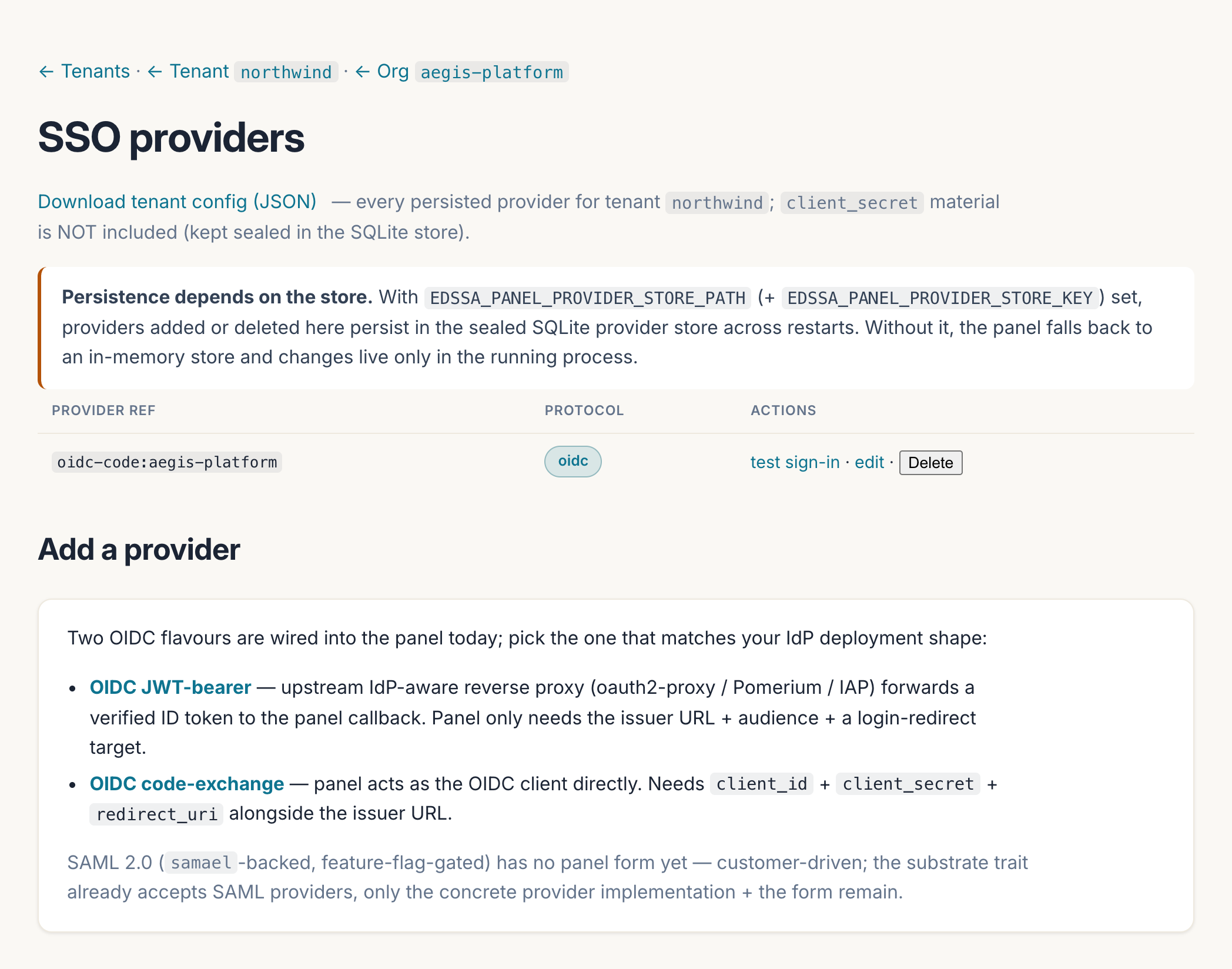
/login. The two OIDC flavours differ in who talks to the IdP: JWT-bearer trusts an upstream IdP-aware proxy (oauth2-proxy, Pomerium, IAP) that forwards a verified ID token, so the panel needs only the issuer and audience; code-exchange makes the panel the OIDC client itself and so needs a client_id, client_secret and redirect_uri. Note the persistence note: without EDSSA_PANEL_PROVIDER_STORE_PATH the panel keeps providers in memory and they do not survive a restart.Both flavours run real OIDC Discovery against the IdP’s
.well-known/openid-configuration at form-submit time and
bootstrap JWKS from it, so a typo in the issuer URL fails at
registration rather than at first login.
Code-exchange specifics
- Token-endpoint auth:
client_secret_basicby default (the method RFC 6749 §2.3.1 obliges every authorization server to support, with the credentials form-urlencoded before the base64 step);client_secret_postselectable on the form for IdP apps registered in body-credentials mode. - PKCE (S256) is always on — a fresh verifier per login attempt, held server-side, never in the browser. There is no off switch: servers ignore unknown authorization parameters, so IdPs without PKCE simply skip it.
- Groups claim is configurable. Empty means the conventional
top-level
groupsarray; pointing it at an IdP-specific claim also handles object-shaped values by taking their keys. For Zitadel, seturn:zitadel:iam:org:project:roles— and enable the app’s ID Token Role Assertion flag, without which the claim is absent from the ID token entirely. A string-valued claim is one group, never whitespace-split (directory group names legitimately contain spaces).
Groups → panel roles
The mapped groups decide the session’s RBAC role at login time:
EDSSA_PANEL_SSO_OPERATOR_GROUPS names the IdP groups (comma- or
semicolon-separated) that grant the operator role; every other
authenticated SSO user is a viewer, whose mutating requests the
role gate answers with 403. Unset means every SSO login is a
viewer — the fail-closed default, so an unconfigured mapping can
never silently mint operators. The role rides inside the
HMAC-signed session cookie, so a role change at the IdP takes
effect on the user’s next login, and editing the cookie’s role
field is a signature break, not an escalation. WebAuthn sessions
are untouched: their role still comes from the panel’s own
per-passkey role store.
code/samples/zitadel-sso/ in the repository stands up a pinned
self-hosted Zitadel, provisions an org / project / roles / app /
two users for the panel (alice with panel-admin — operator
under the sample mapping — and bob with panel-viewer only, the
read-only half of the demo), and emits a ready-made import document
for edssa-panel-import-sso — the fastest way to run the whole
flow against a real IdP locally.
Operator workflow: registering a SAML IdP
This is the path that has not shipped yet — it is written down so the shape is agreed, and step 2 is the gate:
- Operator obtains the IdP’s metadata (Okta / Azure AD / ADFS admin UI).
- Operator configures the provider via the
samael-providercargo feature’s bootstrap config (when that ships in a future batch). - Panel registers the provider at process startup:
registry.register(Arc::new(SamlProvider::new(...)))?. - Operator updates the org’s
Organization::sso_provider_refin the tenant store seed JSON. - Users in that org get redirected through SAML on next
/login; the callback issues a tenant-scoped session cookie keyed on(subject, tenant, org).
Why no samael / openidconnect in edssa-sso
This is about those two crates, not about the protocols —
OIDC ships, as above. It is implemented directly on
jsonwebtoken (+ reqwest for discovery and JWKS), both
optional, rather than by taking the openidconnect crate.
samael pulls in OpenSSL bindings; openidconnect drags
reqwest + a large futures stack. Keeping edssa-sso lean
means:
- Crates that only need the trait (panel session middleware, future audit-event SSO tagger, RBAC matcher) compile fast.
- Concrete providers live in sibling crates that opt into the protocol-specific deps.
- Customer-driven IdP integrations (most enterprise SAML wiring targets one specific IdP at a time) don’t have to drag the full SAML / OIDC dep graph into deployments that don’t need it.
WebAuthn fallback
For organisations without an external IdP, the Phase-5 WebAuthn
flow continues to work at /login/register/start +
/login/authenticate/finish. Operator-admin sessions (single-
passkey, no tenant scope) coexist with SSO sessions: the panel’s
enforce_tenant_rbac returns None for legacy sessions
(operator-admin view) and gates by tenant for tenant-scoped
sessions.
This preserves the upgrade path: existing single-operator
deployments don’t break when SSO providers register. The
WebAuthn ceremony’s CBOR shape doesn’t currently route through
the AuthProvider trait (the Challenge { challenge: bytes }
variant exists for future opt-in but adds CBOR-round-trip
friction without unlocking new behaviour today).
Errors
AuthError variant | HTTP status | Body | Audit |
|---|---|---|---|
InvalidNonce | 401 | empty | yes |
InvalidCallback(reason) | 401 | empty | yes (reason in tracing log only — IdP-error-message-fingerprinting prevention) |
InvalidProtocol(reason) | 400 | empty | yes |
Network(reason) | 502 | empty | yes |
Internal(reason) | 500 | empty | yes (escalation) |
401 bodies are intentionally empty (ADR-006) to avoid leaking “this account exists” / “your IdP rejected the assertion for reason X” oracle behaviour to attackers.
Production hardening
Phase 9 adds a three-layer rate limiter that composes with the existing replay defences. The cryptographic substrate (Bloom / sliding window / response chain) catches token reuse; the rate limiter catches floods of novel tokens that the cryptographic layer happily accepts as fresh.
The three layers
| Layer | Fires | Key | Purpose | Audit emit |
|---|---|---|---|---|
| Per-source-IP | Before header parse | resolved client IP | DDoS prevention; unknown-fleet floods rejected at cheapest layer | Skipped (DDoS fast-path) |
| Per-fleet | After fleet resolution, before verify | fleet_id | DDoS prevention; single-fleet flood before verify CPU burns | Skipped (DDoS fast-path) |
| Per-(fleet, sub-ID) | After verify + range check | fleet_id:sub_id | Forensic abuse detection; compromised credential being burned | Emitted at Tier ≥ Errors with reason sub-id-rate-limited |
The asymmetric audit treatment is intentional: the two DDoS- prevention layers bypass the audit emitter (ring-buffer back- pressure under sustained flood is exactly the failure mode they prevent); the forensic layer emits because operators need “credential X is being abused” in the audit log, and the per- sub-ID throughput is by definition low enough that emitting per throttle isn’t a back-pressure surface.
Configuration
Each layer is configured independently via env. The boot default
is unlimited() — short-circuits to LimitOutcome::Allowed
with zero map allocation, so deployments don’t see a hot-path
regression on upgrade.
Per-source-IP
| Env var | Default | Meaning |
|---|---|---|
EDSSA_RATELIMIT_SOURCE_IP_REFILL_PER_SEC | (unset) | Tokens/sec per IP; absent = unlimited |
EDSSA_RATELIMIT_SOURCE_IP_BURST | 50 | Burst capacity per IP |
EDSSA_RATELIMIT_SOURCE_IP_MAX_KEYS | 65536 | Hard cap on stored IP buckets (LRU; fail-open at cap) |
Per-fleet (global default)
| Env var | Default | Meaning |
|---|---|---|
EDSSA_RATELIMIT_REFILL_PER_SEC | (unset) | Tokens/sec per fleet; absent = unlimited |
EDSSA_RATELIMIT_BURST | 200 | Burst capacity per fleet |
EDSSA_RATELIMIT_MAX_KEYS | 4096 | Hard cap on stored fleet buckets |
Per-fleet overrides land in the manifest (see below).
Per-(fleet, sub-ID)
| Env var | Default | Meaning |
|---|---|---|
EDSSA_RATELIMIT_SUB_ID_REFILL_PER_SEC | (unset) | Tokens/sec per (fleet, sub-ID); absent = unlimited |
EDSSA_RATELIMIT_SUB_ID_BURST | 20 | Burst capacity per (fleet, sub-ID) |
EDSSA_RATELIMIT_SUB_ID_MAX_KEYS | 32768 | Hard cap on stored (fleet, sub-ID) buckets |
Per-fleet manifest override
Manifest gains optional per-fleet rate-limit fields. Both must be set together (or both omitted); partial overrides are rejected at boot.
[[fleet]]
id                        = "prod-hft"
seed_path                 = "seeds/prod-hft.seed"
preset                    = "high-security"
rate_limit_burst          = 50       # tighter than the global default
rate_limit_refill_per_sec = 25.0
SIGHUP-reload applies the new policy on the next request. The
bucket’s accumulated (tokens, last_refill) carry forward across
the policy change — refill uses the new rate; tokens clamp to
the new burst. This is the right semantics for live tuning:
operators don’t want a “reset” on every policy bump.
XFF chain resolver
The per-source-IP limiter needs the real client IP, not the
upstream proxy’s. In production the proxy sits behind one or more
layers (Caddy / Cloudflare / a cloud LB); the TCP peer IP is the
upstream’s, and the real client IP is in X-Forwarded-For.
Trust list
EDSSA_TRUSTED_PROXIES=127.0.0.1,10.0.0.0/8,2001:db8::/32,fc00::/7
Comma-separated mix of bare IPs and CIDR ranges (IPv4 + IPv6). Empty trust list (the boot default) disables XFF parsing entirely — operators behind a real upstream MUST set this; otherwise the limiter throttles by upstream IP only. This is the loud-failure-safe default: aggressive throttling on the upstream fires immediately and operators fix the env var.
Algorithm
- Read
X-Forwarded-For: ip1, ip2, ip3, …. - If trust list is empty → return peer IP (XFF parsing disabled).
- If peer IP is not in the trust list → return peer IP. The request didn’t traverse a trusted proxy, so XFF is meaningless. Defends against an attacker speaking directly to the proxy with a spoofed XFF header.
- Walk XFF rightmost-first; drop trusted hops; first untrusted entry is the client.
- Malformed XFF entry → bail to peer IP. Attacker-injected garbage never silently uses a stale chain entry.
- Every XFF entry trusted → log warn + return leftmost as best-effort (operator’s trust list covers the client’s network; the warn is observable).
Why rightmost-first walk is safe against spoofing
X-Forwarded-For is a hop-by-hop header set by upstream proxies.
An attacker speaking directly to the proxy with X-Forwarded-For: 1.2.3.4 has the peer IP appended after the spoofed value. The
rightmost-first walk reaches the peer (untrusted, since the
attacker isn’t in the trust list) and returns peer — never the
spoofed value.
The only way to forge a client IP is to be a trusted proxy yourself, which is the operator’s security boundary by definition.
Reject responses
All three layers return:
- HTTP 429 Too Many Requests (not 401).
Retry-After: <seconds>header. Rounded up to 1 second minimum so clients don’t hot-loop. Capped atu32::MAXso the header value stays sane even for never-refill buckets (refill_per_sec = 0).- Empty body (ADR-006).
The per-source-IP + per-fleet layers do NOT call the audit emitter; the per-(fleet, sub-ID) layer DOES (security-relevant). All three increment Prometheus counters regardless.
Observability
Counters
| Metric | Labels | When |
|---|---|---|
edssa_source_ip_throttled_total | scope (always "source-ip") | per-source-IP 429 |
edssa_ratelimit_throttled_total | fleet | per-fleet 429 |
edssa_sub_id_throttled_total | fleet (sub-ID NOT a label; SUB_ID_MAX cardinality would explode Prometheus) | per-(fleet, sub-ID) 429 |
Gauges
| Metric | Labels | Sampled |
|---|---|---|
edssa_ratelimit_key_count | scope (fleet / source-ip / sub-id) | 1 Hz via tokio task |
edssa_ratelimit_max_keys | scope | once at boot (constant) |
Alert on edssa_ratelimit_key_count{scope=...} / edssa_ratelimit_max_keys{scope=...} > 0.8
to spot when an LRU cap is being approached. Fail-open semantics
mean the limiter doesn’t block traffic at cap — but operators
should bump the cap before the unobserved tail starts breaking
isolation.
Device liveness
A device that fails stops presenting; it does not present badly. So a fleet’s accept rate stays at 100% while a member is dead — the remaining devices keep verifying — and no counter above moves. These gauges are the signal for that failure.
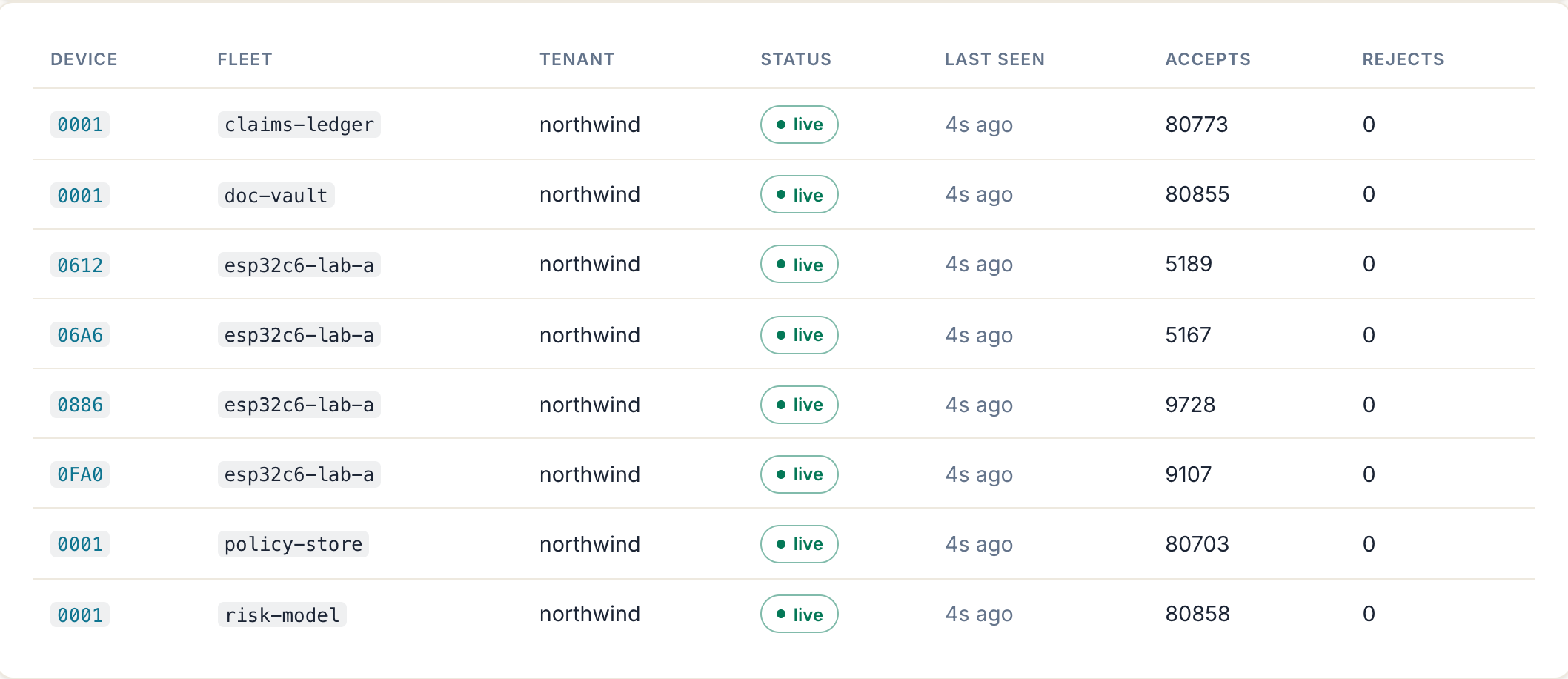
esp32c6-lab-a appear as separate rows — those are four physical microcontrollers on a bench, each with its own device id and its own accept count — so one of them going quiet is visible here as a row falling out of live while the fleet's accept rate stays untouched. The panel reports counts only, never which fingerprint source a device used.| Metric | Labels | Sampled |
|---|---|---|
edssa_devices_seen | fleet | 1 Hz via tokio task; devices whose last presentation is within the 15-minute roster window |
edssa_devices_live | fleet | 1 Hz; the subset within the 15-second live window |
edssa_device_registry_entries | — | 1 Hz; distinct (tenant, fleet, device) triples tracked |
edssa_device_registry_max_entries | — | once at boot (constant) |
edssa_device_registry_overflowed | — | 1 Hz; 1 once the cap has been reached this process |
# A device that presented recently has gone silent.
edssa_devices_live < edssa_devices_seen        # for: 1m
# Device cardinality cap reached — per-device attribution is now
# rolled up per fleet, so `seen` understates the real device count.
edssa_device_registry_overflowed == 1
Two properties worth knowing before you alert on these:
- Exported only when the device registry is enabled
(
EDSSA_DEVICE_REGISTRY_DIR). The families are absent otherwise — absent means not measured, which is a different fact from zero. A fleet that has been observed and has since gone entirely quiet is published at0, not dropped, so a dashboard cannot freeze at a stale count. - Per-process, like every metric here. A proxy restart resets
both gauges together, so the went-silent comparison cannot
false-fire on a restart (
0 < 0is false) and repopulates within one live window as devices present again. Device identity is the claimed sub-ID of whoever holds the fleet seed — attested activity, not a hardware-rooted identity. The sub-ID is deliberately not a label (see the counter table).
Both windows are fixed in the server build. The 15-second live window is sized from measurement rather than taste: on the reference hardware fleet a healthy device’s staleness is sub-second (p50 0.27 s, p95 0.52 s over 3556 observations) while real outages last minutes, so nothing legitimate occupies the band between.
These gauges detect a silence a flush-interval sooner than the
file-based device roster does, and the difference is data
freshness, not disagreement. The gauges read the proxy’s live
in-memory aggregate, so they turn over within the 15-second
window. Anything reading the flushed JSONL registry is looking
at a snapshot up to one EDSSA_DEVICE_FLUSH_INTERVAL_SECS old
and widens its comparison by exactly that lag — so it never
reports a healthy device as silent merely because the file has
not been rewritten, at the cost of detecting a real silence up
to one flush later. Alert on the gauges; read the registry for
per-device history.
Existing DDoS fast-path
The pre-Phase-9 reject paths for malformed headers
(missing-header / malformed-header / wrong-length) already
bypass the audit emitter — they increment the
edssa_rejects_total{reason} counter only. The new 429 rate-
limit reject paths follow the same discipline. Operators auditing
the hot path can confirm: the audit emitter (audit_sink.emit)
is only reached after fleet resolution succeeds AND the
rate-limit gates pass.
Operator runbook
Tuning checklist
- Boot with unlimited (the default). Measure baseline traffic for a week.
- Set per-source-IP first — the cheapest layer, easiest to
over-tighten. Start at 5× peak observed QPS per IP; alert on
edssa_source_ip_throttled_totalrate > 0 for legitimate clients. - Set per-fleet next — global default; per-fleet manifest override for outliers. Tight bucket for HFT-grade fleets; loose for public-API fleets.
- Set per-sub-ID last — the abuse-detection layer. Start
permissive; tighten when audit-log shows
sub-id-rate-limitedrejects correlated with suspicious sub-IDs. - Configure
EDSSA_TRUSTED_PROXIESthe moment the proxy sits behind any upstream. Without it, per-source-IP throttles by upstream IP only (every client looks like one IP).
Suspected attack response
edssa_source_ip_throttled_total{scope="source-ip"}spike alone → DDoS attempt; the per-source-IP layer is doing its job. Confirm peer IPs via tracing logs.edssa_ratelimit_throttled_total{fleet=...}spike → legitimate-looking traffic to one fleet. Check whether the fleet’s seed was rotated recently (legitimate spike) or if a credential has leaked.edssa_sub_id_throttled_total{fleet=...}+ audit-logsub-id-rate-limitedrejects → forensic signal that a specific credential is being abused. Rotate the seed (F-25 cooperative recovery) immediately; investigate the audit trail for the affected sub-ID.
What’s NOT in this batch
- Per-fleet rate-limit panel UI. Today operators edit
fleets.tomldirectly and SIGHUP. A future batch lands a/fleets/:id/rate-limitform posting to a SIGHUP-trigger flow. - Audit Tier-3 trace surfacing rate-limit state. The bucket’s
(tokens, last_refill)snapshot at emit time would let forensic analysis replay the throttle decision. - Criterion bench suite over the limiter hot path under simulated 10k QPS — operator capacity planning needs concrete numbers; lands as a focused perf-pass batch.
SDK reference
Availability — read this first
None of these SDKs is published yet, and the source repository is private. They are built and tested, and the APIs below are real, but today you cannot install any of them from a public registry:
edssa-coreis not on crates.io, there is noedssapackage on PyPI, andedssa-io/edssa-go/edssa-io/edssa-pydo not exist as public repositories. EverySource:link on this page therefore resolves only for people already inside the repo.This page is an API reference, not an installation guide. Treat the snippets as a description of the surface you get once distribution opens, and the package names as intended rather than claimed.
If you need to integrate today, write to support@edssa.io. SDK access is arranged per customer under the licence, because the code is BSL 1.1 and part of it is under a patent filing hold.
If you are an Autopliance subscriber, you do not need any of this to get value from your plan — your plan includes hosted traffic against your own fleet, which is what produces the chain your reports are generated from. See Autopliance — getting started.
Four SDKs exist in-tree: Rust, Go, Python and Node/TypeScript.
Rust — edssa-core
The native engine crate. Anything you can do at the CE binary layer, you can do directly from Rust.
Not on crates.io — cargo add edssa-core does not resolve. Inside the
repo it is a path or git dependency.
#![allow(unused)]
fn main() {
use edssa_core::{verify_token, ActiveEdssaState, encode_sub_id};

fn check(token: &[u8; 64], state: &ActiveEdssaState<64>) -> bool {
    verify_token(token, state).accepted
}
}- Source:
code/edssa-core/in the (private) monorepo. - Feature flags: the
enterpriseumbrella (default-on) gates theoracle,orbit,relay,swarm, andweavermodules (plus their re-exports, e.g.MedianOf3). CE consumers should setdefault-features = false; the CE-visible surface (verify_token,construct_token,ActiveEdssaState,EdssaCore,EdssaRouter,RatchetState,encode_sub_id/decode_sub_id,SUB_ID_SLOTS,SUB_ID_MAX) stays available. - Stability: the engine API (
verify_token,construct_token,ActiveEdssaState,EdssaCore,EdssaRouter) is the patent surface. Other modules are evolving and may change between minor versions.
Go
Intended import path github.com/edssa-io/edssa-go — that repository
does not exist publicly, so go get cannot resolve it. The code lives
in-tree at code/sdk/go/.
cgo binding over edssa-core-ffi (Phase-8 batch 4 substrate).
The Go SDK statically links the C ABI, so consumers don’t ship
the edssa-core-ffi shared library separately.
import "github.com/edssa-io/edssa-go"

state, err := edssa.NewStateFromSeed(seed, edssa.Balanced)
if err != nil { ... }
defer state.Close()

ok := state.Verify(token)
- Source:
code/sdk/go/in the (private) monorepo. The publicedssa-io/edssa-gomirror is not published yet. - Underlying C ABI:
code/edssa-core-ffi/in the (private) monorepo. The committed header (include/edssa_core.h) is the source of truth for the Go binding.
Python
Package name edssa-sdk (import edssa_sdk) — not on PyPI, so
pip install edssa-sdk fails today. Do not substitute a similarly-named
package from the index: none of them is ours. The code lives in-tree at
code/sdk/python/.
A ctypes binding over the same edssa-core-ffi C ABI as the Go and
Node SDKs — pure Python, no native-addon build, no third-party
dependencies. It loads the prebuilt libedssa_core_ffi.{dylib,so} at
runtime. Same engine, same wire format. (Earlier revisions of this page
said “PyO3 wrapper”, which was ADR-001 / D-6’s plan; what was built is
ctypes, chosen so the SDK needs no compile step at install time.)
from edssa_sdk import load

edssa = load()                # finds libedssa_core_ffi, or pass a path
with edssa.new_state(seed, chaff_count=16, threshold=33) as st:
    ok = st.verify(token)     # token: 64 raw bytes (decode_hex for wire form)
- Source:
code/sdk/python/in the (private) monorepo. The publicedssa-io/edssa-pymirror is not published yet. - Pure Python, CPython 3.8+; there are no wheels to build. What ships
beside it is the platform’s
edssa-core-ffishared library.
Node / TypeScript
Built, not published. A koffi FFI binding over the same C ABI as the Go
SDK, in-tree at code/sdk/node/. (Earlier revisions of this page said
Node was deferred to Phase 9 per ADR-001 / D-6; it was subsequently
built, and the page had not caught up.)
Choosing between SDKs
| Use case | Best fit |
|---|---|
| Rust microservice / Tokio runtime | edssa-core directly (no SDK shim) |
| Go service, gRPC interceptor | edssa-go |
| Python web API (FastAPI / Django / Flask) | edssa-py |
| Polyglot service mesh | Run the CE binary as a sidecar, or call the hosted mint API |
Minting: what actually works today
This page previously said the SDKs “handle minting only”. That was
wrong: until 2026-08-08 the C ABI every SDK wraps exported
edssa_state_new and edssa_verify and nothing else, so none of the
SDKs could produce a token.
There are now two real paths, and for a hosted plan the first is the one you want:
- The hosted mint API —
POST /api/v1/fleets/<fleet>/mintonapp.edssa.io, authenticated with an API token from Connect your systems in the app. No SDK, no download, no build: you get anX-EdSSA-Tokenheader back and present it. Any language with an HTTP client works. Present it immediately — a credential is good for about two ratchet intervals, not stored like a bearer token. - Minting in-process —
edssa_credential_at_epoch/edssa_credential_mintin the C ABI, wrapped by the Go, Python and Node SDKs. This exists in-tree and is not published: the SDKs are not on any registry and the repository is private, so this path is available only under a per-customer source licence. See the availability note at the top of this page.
The CE binary is the integration story for non-Rust services that don’t want a build-time SDK dep — drop the sidecar in, point your service at it, and your service stays language-agnostic.
That story has the same availability caveat as the rest of this page: the CE image is not on Docker Hub and binary downloads are not open yet, so the sidecar is built from source rather than pulled. See the Quickstart, which builds it locally.
Operator runbook
Day-to-day operations for an edssa-server-ce deployment.
Deployment topologies
Sidecar (recommended)
┌──────────── Pod / VM ─────────────┐
│  edssa-server-ce :8080  ──▶ app   │
│                                   │
└─── Ingress :80 / :443 ────────────┘
edssa-server-ce listens on :8080; your app listens on
something the sidecar reaches over loopback. An external load
balancer terminates TLS and forwards :443 → :8080.
This is the
samples/nginx-quickstart
samples/k8s-helmpattern. CE supports nothing else by design — multi-tenant gateway patterns are Enterprise.
Behind a TLS edge
edssa-server-ce speaks plain HTTP. Put Caddy / nginx / a managed
load balancer in front for TLS:
client ──TLS──▶ Caddy ──HTTP──▶ edssa-server-ce ──HTTP──▶ app
The CE binary does not verify TLS itself — it relies on the trust boundary at the TLS-terminating proxy. If you need mTLS or a cryptographic edge channel, layer it at the edge.
Seed provisioning
Phase 8 ships the same seed-provisioning bridge as Phase 1
(ADR-003): the operator generates seeds locally, encrypts at rest
with age, and copies to the box. Phase 6 (Enterprise-only) adds
ML-KEM onboarding (F-07) and makes seeds ephemeral.
# 1. Generate
LC_ALL=C tr -dc 'A-Za-z0-9' < /dev/urandom \
  | head -c 1024 > seeds/fleet-demo.seed

# 2. Encrypt at rest against the box's age recipient
age -R seeds/box.age-pub \
    -o seeds/fleet-demo.seed.age seeds/fleet-demo.seed

# 3. scp to the box
scp seeds/fleet-demo.seed.age ops@box:/opt/edssa/secrets/

# 4. Operator decrypts at container start; plaintext stays on tmpfs
For the CE Helm chart, the seed lives in a Kubernetes Secret the
chart references by name (not value) — operators provision it
out-of-band so it never appears in helm get values.
Rotating the seed
CE first cut does not run a ratchet — ActiveEdssaState is
derived from the seed at boot and never advances. Rotating the
seed therefore means rotating clients in lockstep:
- Stop accepting new sessions (out-of-band signal, e.g. set a feature flag in your app).
- Provision the new seed everywhere.
- Restart
edssa-server-ce. - Restart clients with the new seed.
Enterprise’s ratchet driver lets you publish new state under a running verifier without disrupting in-flight requests. CE sidesteps the complexity at the cost of a brief restart window.
Observability
CE intentionally ships minimal observability — no Prometheus endpoint, no transparency log, no F-20 ring buffer. What you get:
- Tracing logs to stdout in JSON. Filter via
RUST_LOG. Audit emissions follow the tier:silent→ no per-request emission.errors→info-level emission on every reject.result→info-level emission on every accept AND reject.
/healthzfor liveness / readiness.
If you need metrics + traces + Tier-4 Merkle audit, run the Enterprise binary.
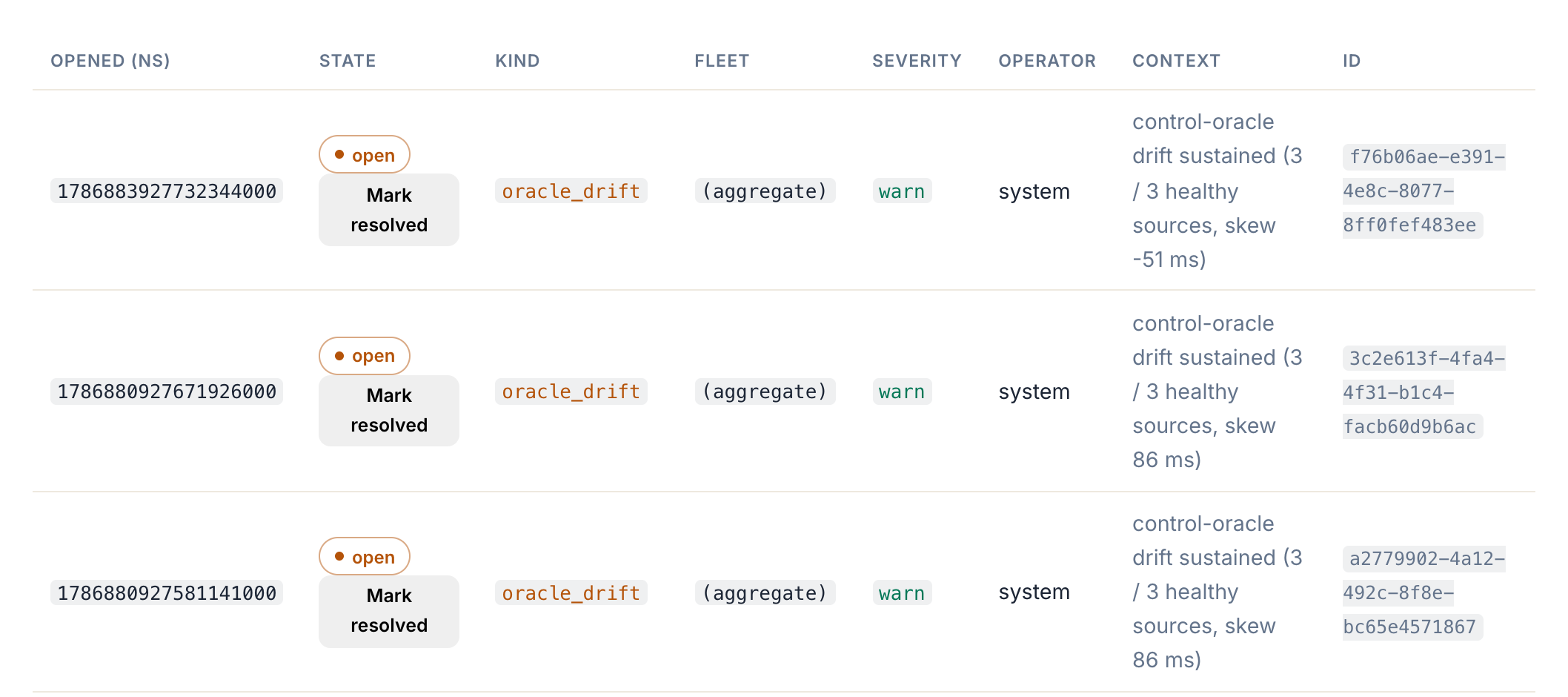
operator: system), and the context string carries the measurement that tripped it — here a sustained control-oracle skew while all three sources were still healthy, which is the case a liveness check alone would never report. Each stays open until an operator resolves it, so the record survives the condition clearing.Common operations
“How do I add a fleet?”
You don’t. CE is one fleet per process. Spin up another CE binary for the second fleet, or upgrade to the Enterprise build for multi-fleet routing.
“How do I tighten the security posture?”
Switch the manifest preset:
preset = "high-security"→T = 44(no margin; every secret byte must match).- Drop
sub_id_rangeto a tight band, e.g.[1, 8], so a compromised sub-ID claim from one client can’t pose as another.
Per-byte tightening:
- Set
chaff_Chigher → smallerR_effbut smaller observable attack surface. - Set
threshold_Tclose toR_eff→ less resilience, more bits of effective secrecy.
“How do I temporarily disable enforcement?”
Don’t. If you need a bypass, put a feature flag in your app and route the bypassed traffic to the upstream directly — never wave the sidecar through.
“What happens if the seed file disappears?”
edssa-server-ce fails to start with seed_path does not exist.
The previous binary keeps running; the next restart fails. Tie the
restart loop into your platform’s “stop accepting new connections”
behaviour so a missing seed = service degraded, not service down.
Patent advisory
EdSSA is patent-pending. The Community Edition ships under BSL 1.1 with an explicit non-revocable patent grant for permitted use (non-commercial OR commercial ≤ $1M ARR). See Patent advisory.
Patent advisory
EdSSA is patent-pending. This page exists so operators and contributors know where the patent claims land, what the Community Edition license grant covers, and how to find the public docket.
Scope
The EdSSA patent application covers the credential-construction
- verification methodology — the use of:
- a per-fleet seed expanded into per-slot expected bytes;
- random-byte chaff slots whose positions are part of the verifier state;
- a threshold-based byte-match acceptance shape (not strict byte-for-byte equality);
- per-request sub-identifier claims that bind the verification to a sub-fleet / sub-tenant;
- the cellular ratchet driving expected bytes forward on a clock-derived cadence with a median-of-3 drift corrector.
(Patent figures FIG. 1–FIG. 4 are referenced from the Architecture page; they will be embedded here once the A1 publication ships.)
License grant (BSL 1.1 + Additional Use Grant)
The Community Edition ships under the Business Source License 1.1 with these specific terms (per ADR-001 / D-5 in the roadmap):
| Term | Value |
|---|---|
| License | Business Source License 1.1 |
| Change License | Apache-2.0 |
| Change Date | 4 years after each commit, per file |
| Additional Use Grant | “non-commercial OR commercial ≤ $1M ARR” |
| Patent grant | Non-revocable, scoped to permitted use |
Practically: you can use, modify, and redistribute the Community Edition for personal projects, OSS dependencies, internal tooling, and commercial production deployments as long as your annual revenue from products incorporating EdSSA stays under $1M. The patent grant explicitly covers the permitted use — using EdSSA at those scales does not infringe the patent.
Above $1M ARR you need a commercial license — contact
legal@edssa.io.
What’s NOT in the CE patent grant
- Use of the Enterprise-only patent claims (F-03 swarm, F-07 ML-KEM onboarding, F-16 drift corrector, F-19 response-ID chain, F-21 Tier-4 Merkle audit, F-24/F-25 cooperative recovery, F-26..28 payload channel) — these ship under separate Enterprise terms.
- Use of the trademarks “EdSSA” or “Parity Express” beyond describing your use of the product. Standard nominative-use is fine; using the marks in your own product name is not.
- Redistribution of the Community Edition as a managed service (“EdSSA-as-a-Service”) above the $1M ARR threshold.
Public docket
The patent application is in prosecution at the time of the v1.0.0-ce release. After A1 publication (≈18 months from filing priority date) the full specification is publicly searchable. The EdSSA project maintains a redacted public copy at:
📌 Link pending publication. The public-docket URL lands here as part of the Phase-8 public-migration step, alongside the Caddy block for
docs.edssa.io.
Frequently asked
Can I fork the Community Edition?
Yes, with these conditions: the fork must retain the BSL 1.1 license text + the patent grant; the Change Date and Change License apply per-file as committed; and the Additional Use Grant threshold ($1M ARR) applies to the fork’s commercial use of the patent claims, not the fork’s existence.
Can I write an SDK for the Community Edition?
Yes. SDKs that wrap the wire format / engine surface fall under the same Additional Use Grant. The Rust / Go / Python SDKs ship from EdSSA-controlled repos; community SDKs are welcome — tell us at support@edssa.io so we can link to it from the SDK reference. (The issue tracker lives in the source repository, which is not public yet.)
Is there a “non-asserted” patent clause?
The Additional Use Grant is the binding text. There is no separate non-assertion pledge — but the patent grant is non-revocable for permitted use, which is the practically identical outcome.
Who do I contact for legal questions?
legal@edssa.io. The team replies within
2 business days for license-clarification questions; commercial
license negotiations take longer.