Autopliance — getting started
EdSSA Autopliance is the hosted compliance product: a subscription that turns a live evidence chain into audit-ready reports. This page takes you from nothing to a generated report, and then to a paid plan, without a sales call. Budget fifteen minutes.
If you want the self-hosted protocol instead, start at the Quickstart — Autopliance is the product for teams who want the evidence without running the infrastructure.
1. Create an account
Go to app.edssa.io/login and enter your work email. The same form creates the account — there is nothing separate to sign up for, and no password exists to choose or lose: sign-in links are single-use and expire in fifteen minutes.
Every new account starts on a 14-day trial. No card is asked for at any point during it.
2. Get your trial fleet
The app’s first step, Test Fleet, provisions a hosted fleet for you: a real verification boundary with its own evidence chain, not a simulation. Two things to know:
- The seed is shown once. It is the fleet’s credential. The reveal page will not show it again, so store it like a password. (We keep the copy the verifier needs; the one on your screen is yours.)
- The fleet is yours for the trial plus a grace period — converting on the last day does not cost you the chain you accumulated.
3. Drive it
A chain with nothing on it proves nothing, so send some traffic:
Have us drive it. The Run it step has a “drive it for me” button that sends real, verified traffic to your fleet from our side — actual credentials checked by the actual verifier, not a mock. Each press runs about two minutes. This is the supported way to build a chain today, and it is part of what you are paying for: the entry plan includes 24 of these a day.
Driving it from your own systems is currently closed. The hosted mint API — the one that hands your systems a ready-made credential to present over plain HTTP — is not open to new accounts while a patent application covering the credential mechanism is being prepared. We expect to open it again once that application is on file.
If you want it before then, ask: pick Access under NDA on the support form in the app, or write to support@edssa.io. We open it per account, under a confidentiality undertaking, and it takes a day rather than a quarter.
Nothing else in this guide depends on it. The fleet, the evidence chain, the anchored reports and the verification all work exactly as described above — the mint API is how you put your own systems in the chain, not how the product works.
The other path — deriving credentials in-process, inside your own binary rather than calling the API — is the one that is still gated: the SDKs are not on any public registry and the repository is private, so it is available under a per-customer source licence. The SDK reference states plainly what you can and cannot install today.
Either way, verified traffic accumulates into anchors on your chain. Ten anchors is enough for a report worth showing to someone.
4. Generate a report
The Generate step renders a report against your own chain. Pick a framework — the catalog spans 34, including NIS2, SOC 2, ISO 27001, GDPR Art. 28, DORA, the EU AI Act, FedRAMP and the Finnish Katakri/PiTuKri/Julkri set — and a format: HTML, PDF, Markdown, JSON, or OSCAL for the GRC pipelines that ingest machine-readable assessment results.
Report provenance is stated on the document and never inflated: a report generated from your live chain says anchored because its verdict was computed by walking that chain.
And it says whose events those were. Where we drove the traffic, every anchored report carries events generated by EdSSA, not by the subject alongside the anchored marking, in all five formats. That makes it good evidence about the EdSSA component in your architecture — the slot a subprocessor’s evidence goes in — and not proof that your own estate is attested.
Once your own systems present credentials, the reports say that instead. A chain carrying both reads as mixed and names each count, and only the externally-presented share is evidence about your systems; the report states it in those words rather than leaving you to infer it. That marking is computed from what actually reached the verifier, so it is not something either of us can set. Which control to file either kind against is covered in Fitting it into your tools.
Example reports for every framework are downloadable without any account on edssa.io/why/compliance — they say so on every page.
5. Upgrade when it earns it
The in-app pricing page lists the tiers; the entry tier is Autopliance at €149/month, and upgrading is one Stripe checkout. No VAT is added today — the seller trades under the Finnish small-business exemption (AVL 3 §) and each invoice states that as the reason — so the price you see is the amount charged. Invoices, card changes, plan changes and cancellation all live in the billing portal, reachable from your account page.
Two commitments worth knowing before you pay:
- Evidence is never held hostage. Nothing is taken away the moment you stop paying. When a subscription or trial ends the account goes read-only and everything stays downloadable for 90 days — every report you generated, in every format, plus a JSON export of your account and its metadata. After that the account and its data are deleted, and we say so plainly: holding your evidence indefinitely, with no contract, is a liability rather than a favour. Download the reports — a finished report does not depend on us existing, which is the point of the product. If you would rather we kept hosting it, Autopliance Archive (€19/month) does exactly that. You can also delete everything immediately, at any time.
- Prices are list prices. What the pricing page shows is what checkout charges. If the two ever disagree, checkout refuses rather than charging the difference.
6. You have subscribed — what to do first
Payment confirms in seconds and the plan is live as soon as Stripe tells us, which is usually before you are back on the site. Nothing is installed and there is nothing to download: your fleet, your chain and your reports are the same ones you were already using, with the trial limits lifted. If you subscribed before ever creating a fleet, start at step 2 above — that is the only step that must happen before a report can say anchored.
A first session that ends with something worth keeping:
- Check the plan took. app.edssa.io/pricing names your current plan. Your card receipt comes from Stripe separately, and invoices live in the billing portal on your account page.
- Drive your fleet (Run it → drive it for me) and let it finish.
- Watch the chain grow. The fleet page shows anchors as they seal. Ten is a reasonable floor for a report you would show someone.
- Generate the framework you actually need, not the demo one — the catalog spans 34.
- Take the signed evidence archive, from your account page. It is your anchor chain packaged for someone who does not trust us — see below.
- Put it where your audit actually runs. Whatever you use — Vanta, Drata, ServiceNow, Jira, Confluence, AWS Audit Manager, a SharePoint folder your auditor has access to — there is a short path from a generated report to that system, and Fitting it into your tools has it per tool. Most are a file and under five minutes.
- Add your colleagues — the entry plan seats three.
What the entry tier gives you each month, so nothing is a surprise:
| Autopliance (€149/mo) | |
|---|---|
| Anchored reports | 20 per calendar month |
| Illustrative reports | 20 per calendar month, counted separately |
| Hosted traffic runs | 24 per day |
| Seats | 3 |
| Fleet | 1 |
Limits refuse politely rather than charging overage: if you hit one, the app says which limit, what it does not affect, and what lifts it. Nothing you have already generated is ever withdrawn.
Then a rhythm that suits most teams: drive the fleet on whatever cadence your evidence needs to reflect, regenerate the report when someone asks for a current one, and keep a copy of each somewhere of your own.
7. The signed evidence archive
Your account page has Download archive (.tar) beside the JSON export. The two are different things and it is worth knowing which is which:
| What it is | |
|---|---|
| JSON export | Data portability: your account, report metadata, fleet metadata, email preferences. |
| Signed evidence archive | Your anchor chain — the cryptographic record itself. |
The archive contains every anchor your fleets have sealed, the transparency logs that let a reader walk the chain rather than take its endpoints on trust, a manifest listing every file with its SHA-256, and a detached Ed25519 signature over that manifest. Because the manifest commits to every file, one signature covers the whole archive.
It contains only your fleets.
How an auditor checks it, without us
The archive ships a README.md with the exact commands. They need
openssl and a shell — nothing of ours, no account here, and no call to
us. In outline:
-
Verify the signature over
manifest.json:openssl pkeyutl -verify -pubin -inkey edssa-export-pubkey.pem -rawin -in manifest.json -sigfile manifest.json.sig -
Check every file against the digests in the manifest.
-
Walk the chain: in the transparency logs each anchor carries the previous anchor’s root, so records cannot be reordered, back-dated or removed without breaking a link.
-
Check where the chain starts. Step 3 checks every link except the first — nothing precedes anchor 1 — so a chain with its beginning removed would pass. The first anchor’s
prev_rootis the fleet’s domain-separated genesis value, which the README shows how to derive independently and compare.
The key bundled in the archive is a convenience copy — it arrived in the same archive it vouches for. Check it against the fingerprint published here:
EDSSA evidence-export signing key (Ed25519), app.edssa.io
3b17ee4241fa46c2815df74aa9f6915868cf8f10edb88fe5a47ba4f22346a984
This key signs archives issued by app.edssa.io. If it ever changes we
will say so here and date the change, because archives already in
auditors’ hands verify against the key that signed them.
What it proves, and what it does not
It proves the anchors form an unbroken sequence and that we attest to them as of the export date. It does not prove what any individual event contained: the batches are your traffic, and they are not in the archive by design.
It is the chain, not a report. When you need the framework mapping — NIS2, SOC 2, ISO 27001 — generate a report; the archive is what backs it.
8. Bind your own records — substance binding
Everything above anchors events: proof that verified presentations happened, in order, at a time. The step beyond it is substance binding — committing the content of your own business records, field by field, so the same chain that proves “this happened then” also proves “and it said exactly this”.
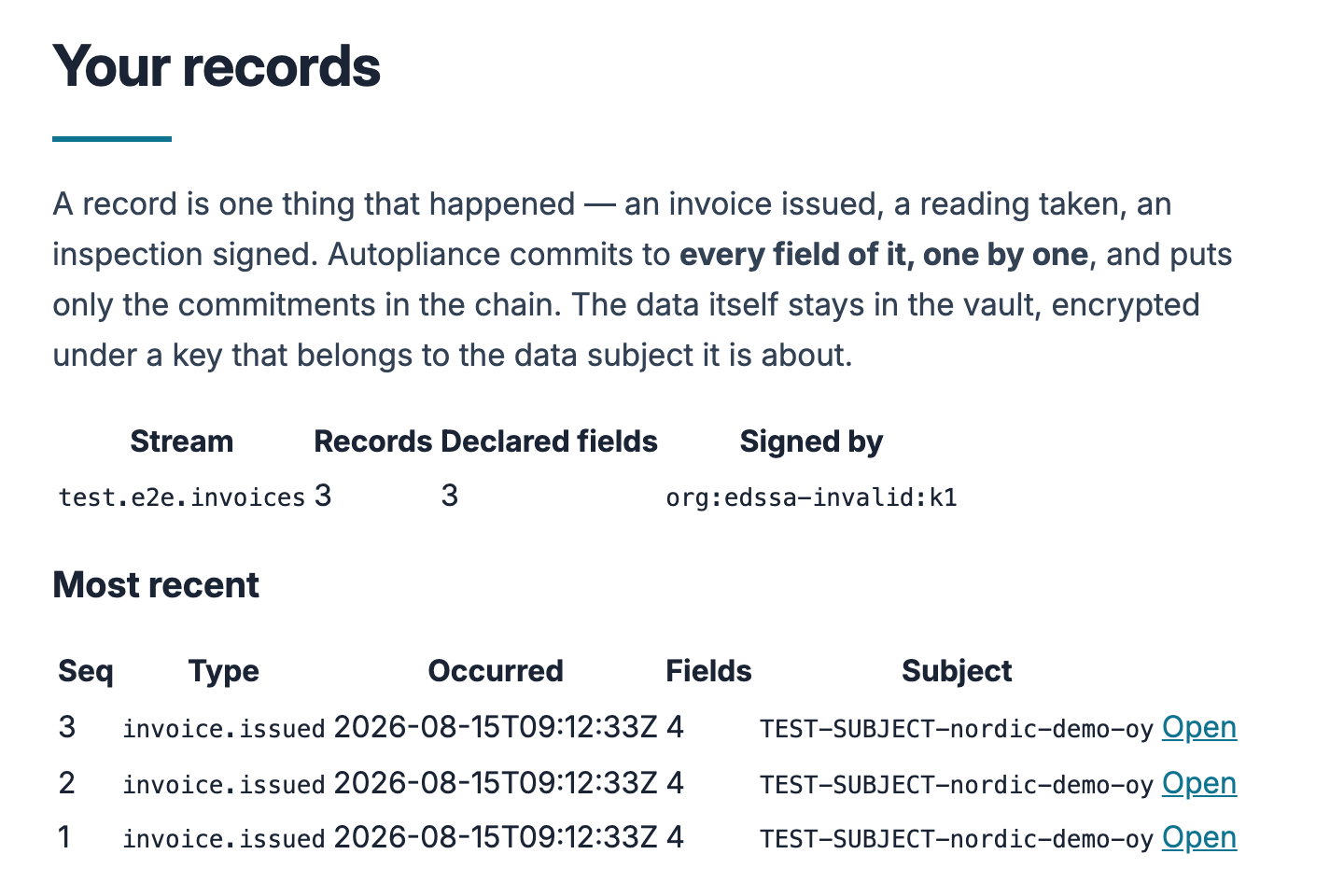
test.e2e.*.You post your own JSON — an invoice, a sensor reading, an inspection — in whatever shape your system already produces:
curl -X POST https://app.edssa.io/v1/records \
  -H "Authorization: Bearer $AUTOPLIANCE_TOKEN" \
  -H "Content-Type: application/json" \
  -d '{
    "stream": "erp.invoices",
    "record_type": "invoice.issued",
    "occurred_at": "2026-08-15T09:12:33Z",
    "subject_id": "acme-oy",
    "payload": { "invoice": { "total": { "amount_minor": 1249900, "currency": "EUR" } } }
  }'
Every field is committed individually, which is what makes the two headline properties possible:
- Change one cent and the proof visibly breaks — each value sits behind its own salted commitment.
- Reveal one field, keep the rest sealed. A disclosure bundle for your auditor carries exactly the fields you tick — the others are not redacted in it, they are not in it — and it verifies offline, with no account here and no call to us.
Erasure is by key destruction: destroying a data subject’s key deletes their payloads and leaves the chain intact, with every other subject’s proofs still verifying.
Two honest labels, stated here because they are stated everywhere else too: records are signed today with our hosted ingest key, which attests that this service received your bytes — not that your system produced them (customer-held keys arrive with the client library); and a holding proof shows integrity, origin and order — not that the source told the truth in the first place.
Your records live at Your records in the app (account menu), where the disclosure picker does the ticking for you. The full reference — payload rules, field kinds, declarations, verification, erasure — is the substance binding page.
9. When something breaks — or should exist
The in-app Support page (account menu → Support) files bugs, ideas
and help asks; you get an acknowledgement by mail and a person replies
from support@edssa.io. Emailing that address directly works too.
What Autopliance is, and is not
It is cryptographic evidence: proof that specific parties were genuinely themselves, present at recorded moments, in order, with nothing replayed or quietly inserted. It is not an attestation, an audit opinion or a certification, and we are not an accredited certification body — what a report says is what a verifier computed. Where a framework needs an auditor’s opinion, an Autopliance report is the evidence you hand the auditor, not the opinion itself.